The feedback that started this investigation
Feedback on my earlier IIS caching article challenged an assumption I made: does a CRL’s own validity and publication fields ensure timely retrieval, regardless of HTTP caching? I built a lab to experiment with publication, download, storage and validation. Spoiler: My findings show that HTTP cache headers influence Edge’s CRL reuse, read more on how I got to this conclusion below.
The finding is important because publication and client discovery are separate events. Within a CRL, “ThisUpdate” identifies the start of the CRL’s validity, “NextUpdate” its validity limit, and Microsoft’s “Next CRL Publish” extension advertises the next planned publication. None of these fields constitutes a notification to a browser that a replacement has appeared. I wanted to distinguish the signed CRL timeline from the lifetime assigned to its HTTP response.
I tested Edge 155 (155.0.4283.5) on Windows 11 24H2 (26100.33438), an internal AD CS chain and an IIS HTTPS website. “RequireOnlineRevocationChecksForLocalAnchors” is set to “true“. I used Wireshark, Edge NetLog and Process Monitor. Between relevant measurements, I closed every Edge process before starting the tests. The definition “cold” used in this blog, means clearing cached images and files for all time, “warm” preserves that cache. Times are October 14, 2026, Europe/Amsterdam, UTC+2. CRL numbers below are decimal certutil displays them in hexadecimal.
Finding the cache that Edge actually used
During testing, Edge received CRL 25 while my separately inspected Windows Cryptnet cache still contained CRL 24. Matching Source Url Name to Local File Name in certutil output showed that I was inspecting a different cache. An older Cryptnet entry did not describe Edge’s current state. Here’s how I traced the CRL.
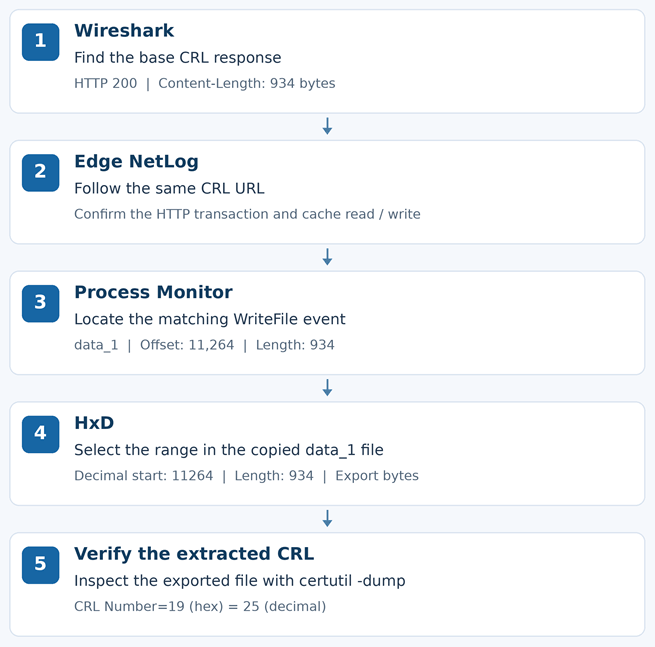
- I started Wireshark and
edge://net-export, visited the HTTPS site and followed the CRL URL. NetLog showed an opened cache entry, revalidation with HTTP code 304 and a read of the stored body. - I isolated the browser clearing options. Clearing only “Cached images and files” removed the entry, the next request created an entry and received 200, which means the body is downloaded. During the attempt I had Procmon running to capture the events.
- I filtered Process Monitor on Process Name is “
msedge.exe” and Path contains “\Cache\“. After clearing the cache, I captured a fresh CRL download and inspected successful “WriteFile"events. - I matched the 934-byte HTTP Content-Length, first observed in the Edge Netlog to a write at 18:04:51.5707940. Its Detail field identified Offset: 11,264 and Length: 934 in the file data_1. Another write contained 709 bytes, matching the root CRL.

- After closing Edge, I copied data_1. In HxD, Ctrl+E selected decimal offset 11264 and length 934: bytes 11264 through 12197 inclusive. In hexadecimal, those values are start 2C00, length 3A6 and end 2FA5.
- I extracted that range and inspected it with
certutil -dump. It was base CRL 25, byte-for-byte identical to the body recovered from NetLog. Matching length was a clue, parsing and byte comparison supplied the proof.
For the actual extraction, I read the copied file into a byte array, copied 934 bytes starting at index 11264 into a new array, and saved that array as a .crl file. The dump exposed the issuer, CRL number and validity fields. This linked a filesystem write to a real revocation object rather than relying on a filename or a matching byte count. For the extraction I wrote a bit of PowerShell code.
$source = "$env:USERPROFILE\AppData\Local\Microsoft\Edge\User Data\Default\Cache\Cache_Data\data_1"
$target = "$env:USERPROFILE\Desktop\Edge-Base-CRL.crl"

$data = [IO.File]::ReadAllBytes($source)

if ($data.Length -lt 12198) {
    throw 'The file is to small.'
}

$crl = New-Object byte[] 934
[Array]::Copy($data, 11264, $crl, 0, 934)
[IO.File]::WriteAllBytes($target, $crl)

certutil.exe -dump $targetThis established the storage location for this capture. Offsets and filenames will change with additional captures. The measured Edge path used its HTTP cache and the inspected Cryptnet cache did not reflect those downloads. The conclusion was that Edge uses it’s own cache, even for CRL’s. Edge cached used for CRL’s:
%LOCALAPPDATA%\Microsoft\Edge\User Data\Default\Cache\Cache_Data\data_1
The used IIS settings
The settings described here, can be found in the configuration editor of the IIS website at “system.webServer/staticContent“
| Setting | Meaning |
| NoControl | No Cache-Control directive from this setting; configured max-age is not applied. Browser heuristics may determine freshness. |
| UseMaxAge / CacheControlMaxAge | Sends max-age in seconds. I tested 600 seconds and 3600 seconds. |
| DisableCache | Sends no-cache: storage remains possible, but reuse requires successful revalidation. |
| setEtag = true | Provides an ETag for conditional requests, unchanged files can return 304 without a CRL body. |
| UseExpires / httpExpires | Sends an absolute Expires date. Not tested; max-age takes precedence when both exist. |
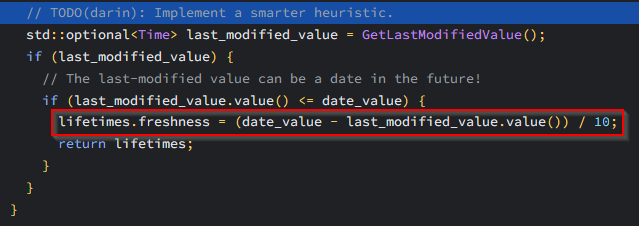
The setting “NoControl” has no fixed default lifetime. Chromium’s GetFreshnessLifetimes implementation uses for eligible responses without explicit freshness. A file last modified ten hours before the response can therefore receive one hour of freshness. This is a code-level fallback, not an Edge preference or a CRL-specific timer. I did not measure that boundary for this Edge build.
The controlled measurements
A GET is a request. A HTTP 200 with a CRL body transfers the file, a HTTP 304 revalidates the stored version without transferring that body. In short, these are my findings while experimenting with the IIS static content settings.
| IIS mode | Cold cache | Warm cache |
| NoControl | 200; CRL 25; no Cache-Control | No CRL HTTP exchange; cache read |
| UseMaxAge 600 | 200; CRL 25; max-age=600 | No CRL HTTP exchange within freshness |
| DisableCache | 200; CRL 25; no-cache | Conditional GET; 304; cached body reused |
Under DisableCache, Edge sent If-None-Match with its stored ETag and If-Modified-Since with the previously received Last-Modified value. No-cache requires revalidation; it is not no-store.
The ETag identifies the stored representation for comparison, it is not the CRL number. Last-Modified is an HTTP file timestamp, not the signed ThisUpdate field in a CRL. I recorded these values separately so that HTTP revalidation could be distinguished from the cryptographic validity check.
| Time | Action | Observed result |
| 19:28:31 | Cold request; max-age=600 | 200; CRL 25 |
| Before 10 min | Restart and revisit | No CRL network traffic |
| 19:39:54 | After 11 min 23 s | 304; freshness renewed |
| About 19:43 | Publish CRL 26 | New version on server |
| About 19:45 | Visit while HTTP cache is fresh | No CRL network traffic |
| 19:50:31 | 10 min 37 s after the 304 | 200; CRL 26 |
Publishing CRL 26 did not invalidate Edge’s cache. The next visit after HTTP freshness expired discovered the change. The 304 renewed freshness, I did not test the exact second-600 boundary.
Silence in Wireshark alone would not prove that revocation checking was skipped. NetLog supplied the missing link, it showed the existing entry being opened and its body read. This is why I retained both kinds of evidence, including captures where no matching CRL HTTP request appeared.
When CRL validity expires first
I shortened base publication to ten minutes, with one-minute overlap and clock skew, while IIS sent max-age=3600. CRL 27 expired at 20:07, before its HTTP freshness ended.
| Time | CRL activity | Validation |
| 19:57:51 | 200; CRL 27 cached | Successful |
| Around 20:10 | Existing cache read; no CRL download | Unable to check revocation; -205 |
| 20:16:14 after clearing | 200; valid CRL 29 | Successful |
A valid replacement was available during the failed check. Edge did not accept the expired CRL, but did not retrieve its replacement in this capture either. HTTP freshness did not extend CRL validity; the result was a validation failure.

Edge-ExpiredCRL-Baseline.json, Edge is not able to verify the certificate.Revoking the certificate with a warm cache
I extended publication to thirty minutes, retained max-age=3600, and cached CRL 30, valid until 20:56. I then revoked the bound server certificate and published CRL 31 containing its serial number.
| Measurement | CRL activity | Result |
| 20:26:11 baseline | 200; CRL 30; 934 bytes | Website loads, validation succeeds |
| Around 20:30 after revocation | Cache read; no CRL HTTP exchange | Website loads, validation succeeds |
| 20:33:17 after clearing | 200; CRL 31; 986 bytes | Certificate is revoked, -206 |
NetLog confirmed successful validation with the retained cache, followed by a revocation failure after clearing it. Publication alone did not make Edge refresh immediately.
I did not change the HTTPS binding between these measurements. The newly revoked serial number was present in CRL 31 and absent from CRL 30. The warm capture showed cache reuse without a replacement transfer; its identification as CRL 30 follows from the known baseline, not from body length alone.
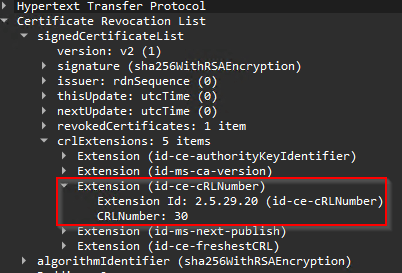
Edge-Revoke-Baseline.pcapng, CRL is transferred.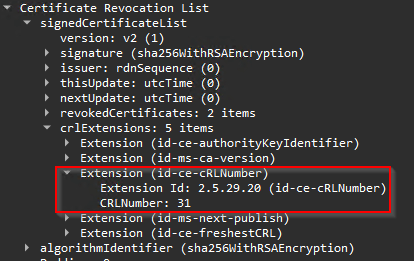
Edge-Revoke-AfterClear.pcapng, crl 31 is send over after Edge cache is cleared
Edge-Revoke-AfterClear.json, Netlog confirms that the cert is revoked.The missing delta CRLs
The base CRL advertised a Freshest CRL URL ending in <>.crl, and delta files were available. Nevertheless, I observed no delta requests in the analyzed Edge captures. The revocation experiment above published a changed base, so it does not prove how Edge handles a revocation published only in a delta. I would test that separately while keeping the base unchanged. I cannot generalize the absence of requests to every Edge version or configuration. This also limits comparisons with Windows components. Seeing a delta in Cryptnet after a PowerShell or certutil check does not establish that Edge used it, based on my tests Edge simply ignores the Cryptnet cache.
My recommendation and the remaining confirmation
For this internal certificate scenario with the tested revocation policies, I would apply “DisableCache” and enable “ETag” specifically on the CRL location for HTTP depended revocation as with Edge. Revalidation can return HTTP 304 when unchanged and HTTP 200 when changed. This minimizes unnecessary CRL payload transfers, not requests or round trips, but that traffic will remain minimal. A short “UseMaxAge” trades fewer requests for delayed discovery. “NoControl” leaves freshness less explicit, I would recommend against using this option for CRL’s.
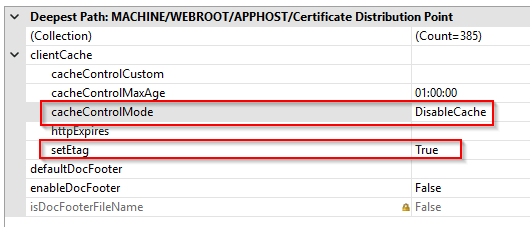
For production deployment, I would validate the actual headers at every published endpoint and monitor request volume. A long max-age should not be treated as a substitute for CRL validity management: the expired-CRL experiment demonstrated a validation failure while the HTTP entry was still fresh.
My recommendation combines measured no-cache revalidation with the revocation experiment under max-age.
Commands and browser shortcuts
These commands inspect evidence unless marked otherwise. I kept forced retrieval and cache deletion out of warm-cache measurements.
| Command | Purpose |
| certutil -v -urlcache crl | Lists the current user’s Cryptnet URL cache, not Edge’s HTTP cache. |
| certutil -dump “<Local File Name>” | Reads the cached CRL number, validity and extensions. |
| certutil -dump “\\lab-srv-01\crl\Corp-Enterprise-CA01.crl” | Inspects the published base on the share. Use the +.crl filename for the delta. |
| certutil -crl | Run on the issuing CA to publish CRLs; changes the server state. |
| certutil -v -urlfetch -verify “<certificate.cer>” | Separate certificate-chain diagnostic; can cause retrieval/revalidation and disturb a cache experiment. |
| certutil -urlcache crl delete | Deletes current-user Cryptnet CRL entries; does not clear Edge’s browser cache. |
| Edge address or shortcut | Purpose |
| edge://net-export | Start and stop NetLog recording before visiting the test site. |
| edge://policy | Check effective revocation policies. |
| edge://version | Record browser build and profile path. |
| edge://settings/clearBrowserData (or Ctrl+Shift+Delete) | Clear only Cached images and files, All time. |
Scripts used in the investigation
I used several PowerShell scripts to collect consistent evidence throughout the investigation. They retrieved CRL numbers and timestamps from the publication share and Windows Cryptnet cache, and parsed Wireshark captures for HTTP status codes, cache headers and transferred CRL numbers. I also used PowerShell to extract the identified byte range from Edge’s cache file so I could inspect it with certutil and compare it with the CRL recovered from NetLog.
| Filename | Role |
| Get-CacheCRLNumbers.ps1 | Retrieves the base and delta CRL numbers from the current user’s Windows Cryptnet URL cache and converts them from hexadecimal to decimal. |
| Get-CachedCRLDates.ps1 | Displays ThisUpdate, NextUpdate and Next CRL Publish for the base and delta CRLs stored in the current user’s Windows Cryptnet URL cache. |
| Get-ServerCRLDates.ps1 | Reads the published base and delta CRLs from the server share and displays ThisUpdate, NextUpdate and Next CRL Publish. |
| Get-ServerCRLNumber.ps1 | Retrieves the published base and delta CRL numbers from the server share and converts them from hexadecimal to decimal. |
| Get-WiresharkCRLInfo.ps1 | Uses TShark to extract CRL HTTP transactions from a capture, including status codes, cache headers, validators and transferred CRL numbers, alongside a separate reading of the current Windows Cryptnet cache. |
The scripts are available for download here.
Evidence file index
The table below lists the evidence files for each measurement, together with the recorded time range and a brief description of the result. Each shared filename identifies the Edge NetLog (.json) and Wireshark capture (.pcapng). All times are local laboratory time (UTC+2); the ranges reflect the first and last recorded NetLog events.
| Test files .json and .pcapng | From–to Local time | Observation |
| Edge-NoControl-Cold | 19:06:18–19:06:40 | A cold request received CRL 25 with 200 and no Cache-Control directive. Edge created its cache entry. |
| Edge-NoControl-Warm | 19:12:16–19:12:40 | Edge read the stored CRL after restart. No CRL HTTP exchange occurred. |
| Edge-UseMaxAge-Cold | 19:15:11–19:15:35 | A cold request received CRL 25 with 200 and max-age=600. |
| Edge-UseMaxAge-Warm | 19:17:50–19:18:17 | Edge reused the fresh cache after restart. No CRL HTTP exchange occurred. |
| Edge-DisableCache-Cold | 19:20:42–19:21:08 | A cold request received CRL 25 with 200 and no-cache. Edge still stored the response. |
| Edge-DisableCache-Warm | 19:22:55–19:23:15 | Edge sent a conditional GET and received 304. The CRL body was reused from cache. |
| Edge-MaxAge120-A | 19:28:14–19:28:34 | The duration-test baseline received CRL 25 with 200. The actual max-age was 600 seconds. |
| Edge-MaxAge600-B | 19:30:40–19:30:54 | The revisit occurred before HTTP freshness expired. No CRL HTTP exchange occurred. |
| Edge-MaxAge600-C | 19:39:43–19:39:58 | After freshness expired, revalidation returned 304. The response renewed HTTP freshness. |
| Edge-MaxAge600-NewCRL-Fresh | 19:44:36–19:44:54 | CRL 26 was already published. Edge reused its previous fresh entry without a CRL HTTP exchange. |
| Edge-MaxAge600-NewCRL-Expired | 19:50:16–19:50:36 | After freshness expired, the old validators produced 200 with CRL 26. |
| Edge-ExpiredCRL-Baseline | 19:57:35–19:57:53 | CRL 27 was downloaded with max-age=3600. Certificate validation succeeded. |
| Edge-ExpiredCRL-HttpFresh | 20:10:02–20:10:18 | The CRL had expired while the HTTP entry remained fresh. Cache reuse ended in validation error -205. |
| Edge-ExpiredCRL-AfterClear | 20:15:58–20:16:17 | After clearing, Edge downloaded valid CRL 29. Certificate validation succeeded. |
| Edge-Revoke-Baseline | 20:25:59–20:26:13 | CRL 30 was downloaded before revocation. Certificate validation succeeded. |
| Edge-Revoke-Warm | 20:29:54–20:30:07 | CRL 31 already contained the revocation. Edge reused its old cache and still accepted the certificate. |
| Edge-Revoke-AfterClear | 20:33:03–20:33:24 | After clearing, Edge downloaded CRL 31. Validation failed with revoked error -206. |
The evidence files (Wireshark and Edge Netlogs) are available for download here.
Technical references
IIS clientCache settings
Chromium GetFreshnessLifetimes source and 10 percent fallback
RFC 9111 HTTP Caching
Microsoft Edge TLS certificate verification
Eric Lawrence on Edge certificate verification and caching
Leave a Reply