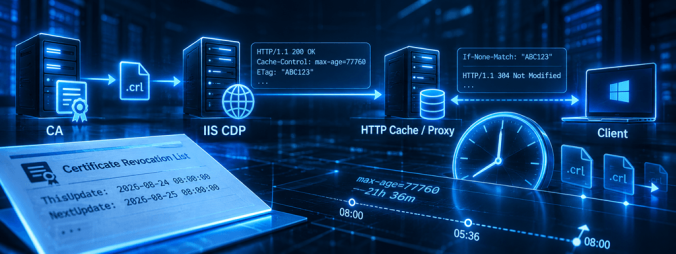
And we’re back again! During PKI assessments, I regularly come across IIS servers that are used as HTTP distribution points for CRLs and CA certificates. Most of the time, the web server itself works perfectly fine. The files are there, they can be downloaded, and certificate validation succeeds. There is, however, one configuration item that I see missing surprisingly often, HTTP caching. And when caching is configured, I regularly find values that do not match the CRL publication schedule. A common example is a cache lifetime of several days while the same web server is also distributing delta CRLs that are published every 24 hours.
Continue readingTag: PKI (Page 1 of 3)
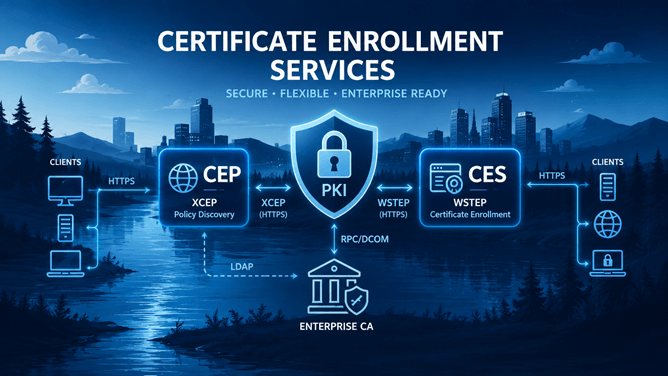
In the previous parts of this series, I’ve built a working Certificate Enrollment Services infrastructure from the ground up. I installed and configured the Certificate Enrollment Policy Web Service (CEP), the Certificate Enrollment Web Service (CES), and eventually used these services from both domain-joined and workgroup computers to request certificates. So far, every service is a single point of failure. If the CEP server became unavailable, clients could no longer retrieve certificate enrollment policy. If the CES server became unavailable, certificate enrollment through the web service stopped altogether. For a lab environment this is perfectly acceptable. For a production PKI, it usually isn’t.
Fortunately for me, CEP and CES were designed with redundancy in mind, so in this part I’m going to extend the environment with a second CEP and CES server. At the same time, I’m going to introduce dedicated DNS aliases: CEP01, CEP02, CES01, and CES02. Until now, our service URLs have been tied directly to the underlying server names such as lab-srv-03. That works, but it unnecessarily exposes the physical server identity as part of the service configuration. By using aliases instead, we separate the name of the service endpoint from the server hosting it. This also gives us much more flexibility if we later want to replace servers or change the architecture without changing the names clients use to access the services.
Introducing aliases means there is a little more work to do. DNS, TLS certificates, Kerberos SPNs, CEP and CES service URIs, and the published enrollment endpoints all need to agree on the new names.
So, let’s build the redundant environment first. In the next article, we’ll find out how highly available it really is.
Continue readingIn the previous parts of this series, I’ve looked at the architecture behind Microsoft Certificate Enrollment Services and built both the Certificate Enrollment Policy Web Service (CEP) and Certificate Enrollment Web Service (CES). At this point, all the server-side components are in place. But having a working CEP and CES infrastructure is only half the story. Ultimately, a client needs to know where to retrieve certificate enrollment policy, determine which certificate templates it is allowed to use, discover the appropriate enrollment service, and finally submit a certificate request. That’s what I will show you in this part.
I will configure Windows clients to use our CEP service in two different ways. First, I will use Group Policy, which is the obvious choice for centrally managed domain-joined systems. After that, I will configure the enrollment policy locally, which is useful for individual systems and becomes particularly interesting when working with devices that cannot rely on Active Directory Group Policy. I will then follow the complete process from policy discovery to certificate enrollment and look at what Windows is actually doing behind the scenes.
Continue readingIn the previous article, we deployed the Certificate Enrollment Policy Web Service (CEP) and configured support for Kerberos, Username/Password, and Client Certificate authentication. Clients can now successfully retrieve certificate enrollment policies over HTTPS using the XCEP protocol. However, while the policy infrastructure is now in place, clients still have no way to request certificates.
In this article, I’ll complete the Microsoft Certificate Enrollment Services architecture by deploying the Certificate Enrollment Web Service (CES). I’ll prepare Active Directory, configure a dedicated Group Managed Service Account (gMSA), install IIS, deploy the CES role, configure the supported authentication methods, and validate the deployment using PowerShell. By the end of this article, you’ll have a fully operational Certificate Enrollment Web Service capable of securely processing certificate requests over HTTPS using the WSTEP protocol.
Continue readingIn the first article of this series, I explored the architecture behind Microsoft Certificate Enrollment Services (CEP & CES) and discussed why Microsoft introduced these web services.I looked at the differences between traditional Active Directory Certificate Services enrollment and the HTTPS-based enrollment model, explained the XCEP and WSTEP protocols, and followed the complete certificate enrollment process from start to finish. Now it’s time to move from theory to implementation.
In this article, I’ll build a complete Certificate Enrollment Policy Web Service (CEP) from scratch using PowerShell. Rather than simply installing the Windows role, I’ll also prepare Active Directory, create the required security groups, configure a Group Managed Service Account (gMSA), install IIS, configure the supported authentication methods, and validate that the deployment is functioning correctly. By the end of this article, you’ll have a fully operational Certificate Enrollment Policy Web Service capable of serving enrollment policies over HTTPS using Kerberos, Username/Password, or Client Certificate authentication.
Continue readingIf you’ve ever worked with Microsoft Active Directory Certificate Services (AD CS), you’ve probably come across the Certificate Enrollment Policy Web Service (CEP) and the Certificate Enrollment Web Service (CES). While Microsoft provides documentation on both services, I often notice that the focus is on how to install them rather than why they exist and how they fit into the bigger picture.
When I started diving into CEP and CES myself, I quickly discovered that understanding the architecture is far more important than simply clicking through an installation wizard. Why are there two separate web services? What problem were they designed to solve? What are XCEP and WSTEP? And when should you actually consider deploying CEP and CES instead of relying on traditional certificate enrollment?
Continue reading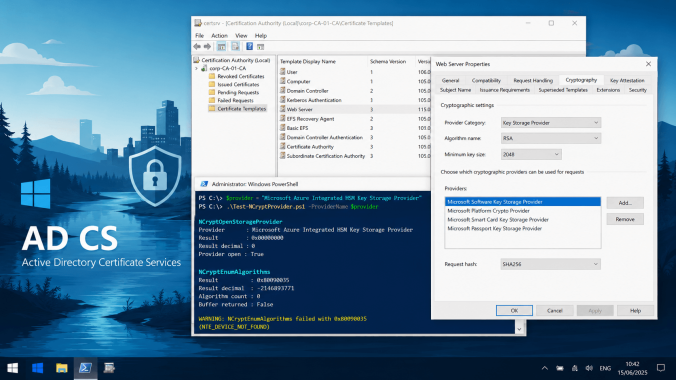
While configuring a new Microsoft Active Directory Certificate Services (AD CS) environment on Windows Server 2025 in Azure, I ran into an unexpected problem while configuring certificate templates. The Certification Authority (CA) itself was working correctly and was configured to use the “Legacy Cryptographic Service Provider“. Cryptography API: Next Generation (CNG) was also functioning normally, and certificate templates could be created using the default settings and succesfully create certificates. But…
Continue reading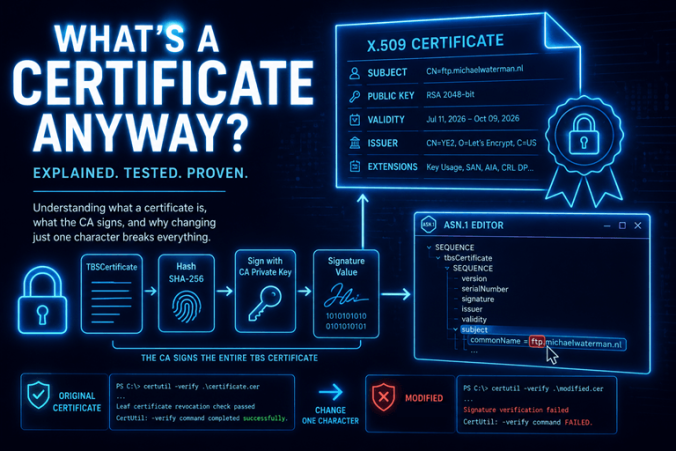
One of the questions I get asked most often during assignments or workshops isn’t really about Certificate Revocation Lists (CRLs), OCSP, certificate templates or PKI in general. It’s much simpler than that.
“What’s a certificate anyway?”
Well actually, I sometimes start with the question, “So, can anyone explain to me what a certificate is or what it represents?”. You would think, it seems like an easy question to answer. Some people will tell you it’s your public key. Others will say it’s your digital identity. While both answers contain some truth, rarely the complete story is told. A digital certificate is much more than a single piece of information. It contains an identity, a public key, validity information, a collection of extensions, and much more. More importantly, all of that information is cryptographically protected by a trusted Certificate Authority (CA).
In other words, a certificate is a digitally signed document that binds an identity to a public key, with a couple of extensions. That digital signature allows anyone who trusts the issuing CA to verify that the certificate has not been modified and that the binding between the identity and the public key is authentic. But what exactly is inside a certificate? What does a Certificate Authority actually sign? And why does changing just a single character invalidate the entire certificate?
Let’s take a look under the hood of an X.509 certificate.
Continue reading
For more than 35 years, X.509 certificates have formed the foundation of digital trust on the Internet and in many organizations alike. From HTTPS and VPNs to enterprise authentication and code signing, the basic architecture has remained unchanged. As we enter the post-quantum era, however, it may not be the cryptographic algorithms that need the biggest overhaul, but the certificate model itself.
Imagine a Certificate Authority such as Let’s Encrypt issuing hundreds of millions of post-quantum certificates. Every one of those certificates now carries a digital signature that is significantly larger than today’s RSA or ECC signatures. Suddenly, TLS handshakes become larger, certificate chains consume more bandwidth, Certificate Transparency logs grow faster, and browsers have considerably more data to process. Everything just slows down.
The challenge is no longer whether post-quantum cryptography works. The challenge is whether the X.509 certificate architecture can continue to scale in a post-quantum world. This is exactly the problem that Merkle Tree Certificates (MTC) are designed to solve.
Continue reading
During many of the Active Directory Certificate Services (AD CS) projects I work on, the discussion always turns to performance. “So Mike, how to we need to scale the machines?” Is the virtual hardware powerful enough? Do we have sufficient memory? How many CPU cores should the Certification Authority have? Is our Hardware Security Module (HSM) fast enough? Will disk I/O become a bottleneck? And perhaps the simplest question of all:
How fast is Active Directory Certificate Services actually?
Another challenge I regularly encounter is the need for a realistic Certification Authority database. Whether demonstrating reporting capabilities, validating certificate templates, testing custom PowerShell scripts, or creating a representative lab environment, an empty CA database simply does not reflect production. After searching for a suitable solution, I realized that nothing really existed that combined realistic certificate generation with meaningful performance benchmarking. Existing tools either focused on enrollment or stress testing, but none provided detailed insight into where certificate issuance time was actually spent….so I built one.
The AD CS Benchmark & Performance Analysis Toolkit is a PowerShell-based utility that generates realistic PKCS#10 certificate requests, submits them through the native ICertRequest2 COM interface, optionally creates matching Active Directory objects, and records detailed timing information for every stage of the enrollment process.
Continue reading