
And we’re back again! During PKI assessments, I regularly come across IIS servers that are used as HTTP distribution points for CRLs and CA certificates. Most of the time, the web server itself works perfectly fine. The files are there, they can be downloaded, and certificate validation succeeds. There is, however, one configuration item that I see missing surprisingly often, HTTP caching. And when caching is configured, I regularly find values that do not match the CRL publication schedule. A common example is a cache lifetime of several days while the same web server is also distributing delta CRLs that are published every 24 hours.
At first glance, this seems like a minor web server configuration detail. After all, the CRL itself contains ThisUpdate and NextUpdate, so surely the certificate validation process knows when it needs a new CRL? It does, but that is only part of the story. There is another mechanism operating underneath it: HTTP caching. Both mechanisms deal with time and freshness, but they operate at different layers and solve different problems. When their configuration is not aligned, you can end up with behavior that is technically correct from both perspectives, but still not what you intended when designing the PKI.
A CRL is just a file on a web server
From IIS’ perspective, there is nothing particularly special about a CRL. It is a static file, period. The same applies to a delta CRL, CA certificate, or any other file that we publish through our HTTP distribution point. When a client needs a CRL, it performs a normal HTTP request to the distribution point specified in the certificate. That request might look something like this:
GET /pki/Corp-Issuing-CA.crl HTTP/1.1
Host: pki.contoso.com
IIS returns the CRL together with the normal HTTP response headers. When IIS client caching is configured, those headers can include something similar to:
Cache-Control: max-age=77760
ETag: "..."
That max-age value is an important part of the mechanism. It tells an HTTP cache how long the returned representation may be considered fresh. It is also important to realize that IIS and the requesting client are not necessarily the only systems involved. There could be a forward proxy, reverse proxy, CDN, or another HTTP caching component somewhere between the client and your IIS server. Each component that is allowed to cache the response can potentially use the caching information supplied by IIS.
As long as a cached response is considered fresh, the cache does not normally have to ask the IIS server whether a newer version exists. It can simply return the copy it already has. This is perfectly normal HTTP behavior and exactly what caching is supposed to achieve. For CRLs, however, it means that the HTTP cache lifetime needs to be considered as part of the overall publication design.
Two clocks are running
Let’s use a simple example. Imagine that our CA publishes a new base CRL every seven days and a new delta CRL every 24 hours. Both files are published through the same IIS website and are therefore subject to the same staticContent/clientCache configuration. We then configure IIS with the following settings:
Set-WebConfigurationProperty -Filter "system.webServer/staticContent/clientCache" `
  -Name "cacheControlMode" -Value "UseMaxAge" `
  -PSPath "IIS:\sites\Certificate Distribution Point"

Set-WebConfigurationProperty -Filter "system.webServer/staticContent/clientCache" `
  -Name "cacheControlMaxAge" -Value "7.00:00:00" `
-PSPath "IIS:\sites\Certificate Distribution Point"A seven-day cache lifetime might initially sound reasonable because our base CRL is published every seven days. The problem becomes apparent when we look at the delta CRL, because that file changes every 24 hours. The HTTP caching layer does not know anything about this. It does not know that the file is a delta CRL, it does not know how often the CA publishes it, and it certainly does not inspect the CA configuration to determine when the next version will appear. As I mentioned earlier, from the perspective of HTTP, it is simply another static object.
The only information the cache has is what the web server tells it. If IIS effectively says that the object may be considered fresh for seven days, then a cache is allowed to treat it that way. A newer delta CRL can therefore already exist on the IIS server while an intermediate cache still considers its existing copy fresh. Nothing is necessarily malfunctioning at this point. The CA published its new CRL correctly, IIS serves the file correctly, and the HTTP cache is following the caching instructions it received. The problem is simply that the two timelines were configured independently of each other.
NextUpdate doesn’t solve this
This is where the distinction between CRL validity and HTTP caching becomes important. Inside the CRL itself are the ThisUpdate and NextUpdate timestamps. ThisUpdate tells us when the CRL was issued, while NextUpdate indicates the time by which newer revocation information is expected to be available. These values are part of the PKI layer and are interpreted as part of certificate and revocation processing.
Cache-Control: max-age, on the other hand, belongs to the HTTP layer. It does not describe the cryptographic validity of the CRL. It describes how long an HTTP representation may be treated as fresh by a cache. The two mechanisms therefore know nothing about each other’s configuration, even though they are ultimately dealing with the same CRL file.
Suppose a delta CRL was issued this morning and remains valid according to its NextUpdate. Later that day, a certificate is revoked and the CA eventually publishes a newer delta CRL containing that revocation. The previous delta CRL does not suddenly become cryptographically invalid simply because a newer version exists. If an HTTP cache has also been told that its existing copy may remain fresh for several days, it may continue serving that copy without contacting IIS. This is one of the reasons the problem can be difficult to spot during normal operation. Certificate validation can still succeed, the CRL being used can still be within its validity period, and there may be no obvious error in the event logs. The client is simply not receiving the most recently published revocation information. For an infrastructure whose purpose is to distribute current revocation information, that is not the behavior we are looking for.
The other extreme
During assessments I also encounter the opposite situation, no explicit HTTP caching configuration at all. That is generally less problematic from a freshness perspective, but it means that we are not making use of one of the useful properties HTTP gives us. CRLs are static objects between publication events. If thousands of clients request exactly the same CRL during that period, there is little benefit in repeatedly transferring an identical file from the origin server when an HTTP cache could safely serve the same content.
Caching can reduce unnecessary requests, bandwidth consumption and load on the distribution infrastructure. The objective is therefore not to disable caching or make the cache lifetime as short as possible. What we actually want is for the HTTP cache lifetime to follow the way the PKI publishes its revocation information.
Start with the fastest-changing CRL
When base and delta CRLs share the same IIS caching configuration, I use the shortest publication interval as my starting point. If the base CRL is published every seven days and the delta CRL every 24 hours, the delta CRL determines the maximum cache lifetime I am comfortable using. This is not because the delta CRL is somehow more important than the base CRL, it is simply the object that changes most frequently.
I also prefer not to configure the HTTP cache lifetime exactly equal to that publication interval. If a new delta CRL is expected every 24 hours, I would rather have cached copies become stale slightly before that boundary than potentially remain fresh slightly beyond it. A simple approach is to use approximately 90 percent of the shortest publication interval. With a 24-hour delta CRL publication interval, that gives us 21 hours and 36 minutes:
24 hours × 0.9 = 21 hours 36 minutes
The corresponding IIS configuration becomes:
Set-WebConfigurationProperty -Filter "system.webServer/staticContent/clientCache" `
  -Name "cacheControlMode" -Value "UseMaxAge" `
  -PSPath "IIS:\sites\Certificate Distribution Point"

Set-WebConfigurationProperty -Filter "system.webServer/staticContent/clientCache" `
  -Name "cacheControlMaxAge" -Value "0.21:36:00" `
-PSPath "IIS:\sites\Certificate Distribution Point"The 90 percent value is not a magic PKI number defined somewhere by Microsoft or in an RFC. It is simply a practical safety margin. You could choose a different margin depending on the design and requirements of your environment. The important part is the reasoning behind the value, the HTTP cache lifetime is derived from the publication behavior of the fastest-changing content on the distribution point rather than from an arbitrary IIS setting.
And then there is the ETag
There is one more component involved in this mechanism. In my IIS CDP configuration I also enable ETags:
Set-WebConfigurationProperty -Filter "system.webServer/staticContent/clientCache" `
  -Name "setEtag" -Value $true `
-PSPath "IIS:\sites\Certificate Distribution Point"It is tempting to think that enabling an ETag automatically solves the freshness problem because it gives the client a mechanism to determine whether the CRL has changed. That is only partially true, because the important question is when that validation actually takes place. While an HTTP response is still considered fresh according to max-age, a cache can normally continue using that response without contacting IIS. There is nothing to validate yet from the cache’s perspective.
Once the cached response becomes stale, the ETag becomes useful. Instead of immediately downloading the complete CRL again, the client or intermediate cache can send a conditional HTTP request containing the ETag it received with the previous response:
If-None-Match: "ABC123"
IIS can compare that value with the ETag associated with the current file. If the CRL has not changed, IIS can respond with:
HTTP/1.1 304 Not Modified
The cached copy can then continue to be used without transferring the entire CRL again. If the file has changed, IIS returns the new version together with its current ETag. max-age and ETag therefore perform two different jobs. max-age determines how long the cached response may be considered fresh, while the ETag provides an efficient mechanism for checking whether the resource has changed once revalidation is required.
Following a CRL through the process
Putting all of this together makes the interaction easier to understand. Imagine that at 08:00 a new delta CRL is published to the IIS distribution point. A client requests that CRL and IIS returns the file together with Cache-Control: max-age=77760 and an ETag such as "ABC123". The 77,760 seconds correspond to 21 hours and 36 minutes, so until 05:36 the following morning the cached representation can still be considered fresh.
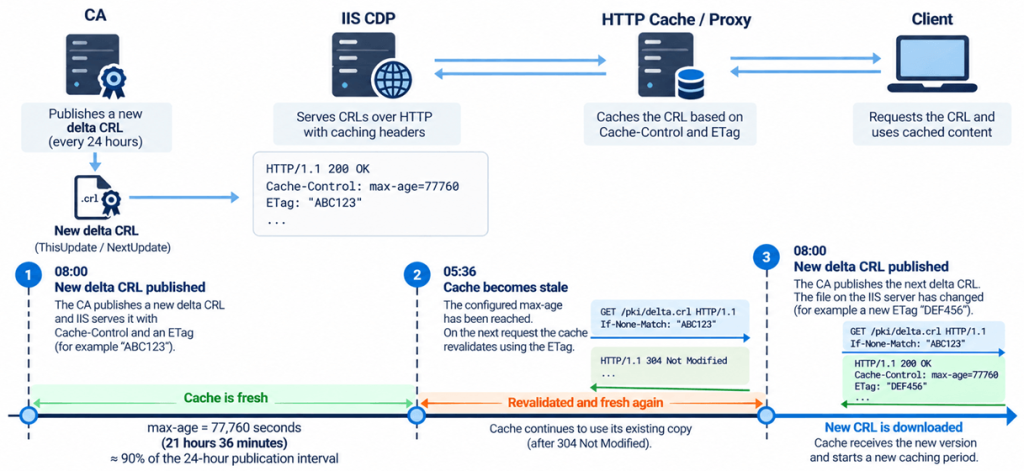
At 05:36, the configured maximum age has been reached and the cached response becomes stale. The next time the resource is requested, the cache can contact IIS and include If-None-Match: "ABC123" in its request. If the file has not changed yet, IIS can respond with 304 Not Modified, allowing the existing copy to be reused without transferring the CRL again.
At 08:00, the CA publishes its next delta CRL and the file on the distribution point changes. The next time revalidation takes place, the validator for the old representation no longer matches the current file and IIS returns the new delta CRL. At that point the caching cycle starts again. This is the behavior we want: HTTP caching reduces unnecessary transfers, but the caching period is short enough to remain aligned with the publication schedule of the CA.
Three timelines, not one
When I review this configuration during an assessment, I find it useful to look at three separate timelines. The first is the CRL publication interval, which tells us how frequently the CA publishes a new base or delta CRL. The second is the HTTP cache lifetime, which determines how long an HTTP cache may treat the downloaded representation as fresh. The third is the CRL validity period, represented by ThisUpdate and NextUpdate inside the CRL itself.
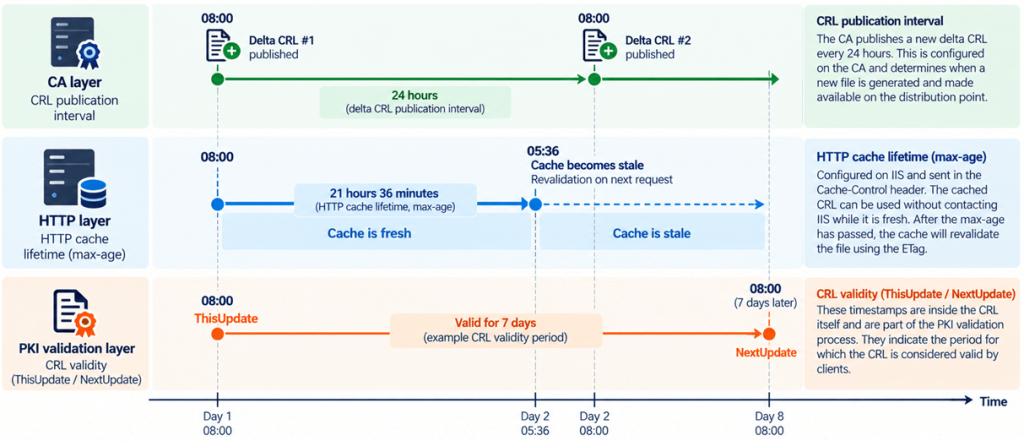
These timelines are related because they all influence how current revocation information reaches a client, but they are not interchangeable. This distinction is often where the configuration goes wrong. The PKI administrator has configured a perfectly reasonable CRL publication schedule, while the web server administrator has configured what appears to be a perfectly reasonable caching policy. Looking at either configuration individually may reveal nothing unusual. It is only when you follow the complete path from the CA through IIS and any HTTP caching layer to the client that you can determine whether those timelines actually work together.
A small configuration detail
HTTP caching on a CRL distribution point is easy to overlook because an incorrect configuration does not necessarily cause an immediate failure. The files download, the CDP URLs are reachable and certificate validation succeeds. Yet an arbitrary cache lifetime can either create unnecessary traffic or, more importantly, delay access to newly published revocation information.
My approach is therefore fairly simple. Look at all of the CRLs being published through the same caching configuration, determine which one has the shortest publication interval and configure the HTTP cache lifetime slightly below that interval. Keep ETags enabled so that once cached content becomes stale, the HTTP layer can efficiently determine whether the file actually needs to be downloaded again. For an environment publishing delta CRLs every 24 hours, 21 hours and 36 minutes is a perfectly reasonable example. But I would not recommend copying that number without first looking at your own CA configuration. If your delta CRLs are published every eight hours, twelve hours, or two days, the calculation changes with them. The IIS configuration should follow the CRL publication design, not the other way around.
Hope this helps with understanding the HTTP Caching and CRL retrieval. Until next time!
Leave a Reply