So, this turned out to be an interesting quest. I had reinstalled my lab Enterprise (issuing) CA, configured the server, issued new CA certificates, and created a new Remote Desktop certificate template. The next step should have been simple: publish the template.
Except it wasn’t. When I tried to publish the template, it didn’t show up.
“Alright, this could just be replication between the domain controllers,” I thought. I waited about ten minutes and tried again. Still nothing.
The default templates could be published without any issues, but no matter what I did, my custom templates simply refused to appear….Weird.
That meant it was time to investigate. What started as a small annoyance turned into an interesting little discovery that I thought was worth sharing in a short blog post. If your custom certificate templates do not appear in Certificate Templates → New → Certificate Template to Issue, the cause may be an incorrect flags value in the Certification Authority object in Active Directory.
Want to know more? Read on…
Symptoms
The behavior was oddly specific. When opening the Certification Authority console and navigating to:
Certificate Templates → New → Certificate Template to Issuethe default templates appeared exactly as expected. Templates such as User, Computer, and Web Server could be selected and published without any issue.
However, the template I had just created, and any other custom template for that matter, simply did not appear in the list. At first glance this makes little sense. Certificate templates are stored in Active Directory, not on the CA itself. If the template exists in the Certificate Templates container, and the CA has permissions to issue it, it should appear in that list. But in this case it didn’t.
That meant something else was going on.
Digging a little deeper
After ruling out the usual suspects, replication delays, template permissions, and template compatibility, I eventually stumbled upon a discussion pointing toward something I rarely look at, the CA object in Active Directory itself. Enterprise Certification Authorities register themselves in Active Directory under the following location:
CN=Enrollment Services
CN=Public Key Services
CN=Services
CN=ConfigurationEach Enterprise CA has its own object there. That object contains metadata about the CA that clients use during enrollment, such as which server hosts the CA and what capabilities it supports. One attribute on that object caught my attention:
flags
When I checked the value using ADSIEdit, it was set to a value of: “2“
According to the thread I found, changing the value to 10 would fix the issue. Slightly skeptical but curious, I changed the value. Almost immediately, the custom templates appeared in the CA console.
Mystery solved.
But of course that raised the more interesting question, What does that flag actually do?
The flags attribute
The flags attribute is a bitmask. Instead of representing a single setting, the number is actually a combination of multiple options stored in individual bits. In other words, the number represents several capabilities of the Certification Authority. When the value was set to the value of “2“, only one capability was enabled. When it was changed to “10“, multiple bits became active. To see exactly what those bits represent, you can query the value using certutil:
certutil -v -ds "Corp-Enterprise-CA" flagsTip! use “certutil -config - -ping” to locate your CA.
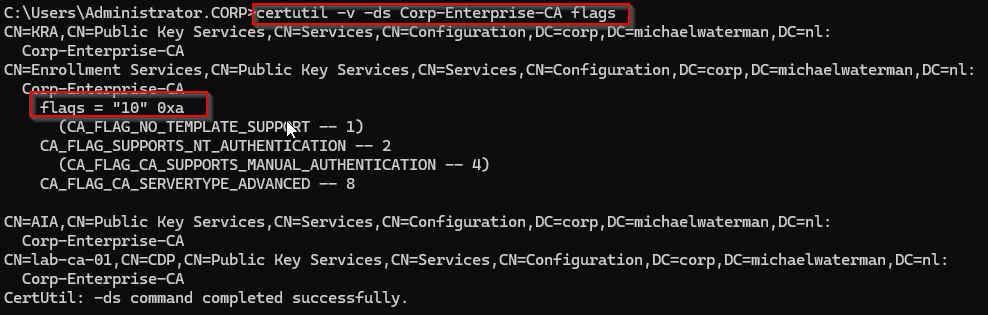
This command reads the CA registration directly from Active Directory and decodes the flag values. As you can see in the output we have a few options available to us:
(CA_FLAG_NO_TEMPLATE_SUPPORT -- 1)CA_FLAG_SUPPORTS_NT_AUTHENTICATION -- 2(CA_FLAG_CA_SUPPORTS_MANUAL_AUTHENTICATION -- 4)CA_FLAG_CA_SERVERTYPE_ADVANCED -- 8
The parentheses indicate flags that are not active. This means the value 10 enables two specific capabilities. Read it like this “10 (decimal) = 0xA (hex) = 1010 (binary)“
Flags explained
CA_FLAG_NO_TEMPLATE_SUPPORT -- 1
If this flag is enabled, the Certification Authority explicitly indicates that it does not support certificate templates. This behavior is typical for Standalone CAs, where requests are submitted manually rather than being based on predefined templates in Active Directory. In an Enterprise CA environment this flag should normally not be enabled, since templates are one of the core features of Enterprise enrollment.
CA_FLAG_SUPPORTS_NT_AUTHENTICATION -- 2
This tells Active Directory that the CA supports authentication using domain credentials. This is expected for Enterprise CAs.
CA_FLAG_CA_SUPPORTS_MANUAL_AUTHENTICATION -- 4
This flag relates to older enrollment workflows where requests might require manual approval or authentication steps before being issued. In my experience, this flag is rarely encountered in modern Active Directory Certificate Services (AD CS) environments and is largely a legacy artifact from earlier versions of Windows Certificate Services.
CA_FLAG_CA_SERVERTYPE_ADVANCED -- 8
This flag indicates that the CA supports advanced Enterprise CA features, including certificate templates. When this bit is missing, Active Directory may treat the CA as if it does not support templates properly. As a result, custom templates will not appear when trying to publish them from the Certification Authority console.
In my specific case, when both bits are enabled, the value now becomes, 2 + 8 = 10. Which explains why changing the value from 2 to 10 resolves the issue.
Why did this happen?
In most environments this flag is set automatically when the Enterprise CA is installed. However, there are a few situations where it can end up in an inconsistent state. This can happen after:
- reinstalling a CA (best guesstimate, this was my situation)
- restoring a CA from backup
- migrating a CA to a new server
- incomplete cleanup of previous CA objects in Active Directory
When that happens, the CA still works normally in most respects, but certain Enterprise features, such as publishing custom templates, may behave strangely. Because the issue originates in the Active Directory metadata for the CA, it can be quite difficult to identify if you are not aware that this attribute exists.
But now you know, and knowing is half the battle…
Final thoughts
In the end, the problem turned out to be a single attribute in Active Directory. A small flag value, almost invisible unless you know where to look, prevented custom certificate templates from appearing in the CA console. Simply changing the value from 2 to 10 restored the expected behavior immediately. It’s a small detail, but a very good example of how much of AD CS actually depends on the metadata stored in Active Directory itself.
And that’s it for today, hope that this helps someone in the future! As always please let me know if you have feedback, comments or just want to say hi.
OMG thankyou so much for this
Aaaaaargh. THANK YOU THANK YOU!!!! No where in any doco or even the AI have I seen this flag.