Deleting a file in Windows rarely means the data is actually gone. In most cases, the file system simply removes the reference to the file while the underlying data remains untouched in unallocated space until it is overwritten. That is exactly why forensic tools can often recover deleted photos, documents, and other files long after a user believes they are gone.
When organizations need to prepare systems for redeployment, decommissioning, or internal reuse, many immediately look at commercial wiping solutions. What is often overlooked is that Windows already includes a native tool capable of securely overwriting deleted data: cipher.
And yes, it’s been there for a really long time.
While cipher is mostly known for its role in the Encrypting File System (EFS), the /w switch serves a very different purpose. It overwrites all unallocated space on a volume in multiple passes, making previously deleted files extremely difficult—or in most practical cases impossible—to recover, even with forensic carving techniques.
In this blog, I will walk through a simple forensic demo. We start with a small NTFS disk containing photos, delete the files, and create a forensic image to prove the data is still recoverable. Next, we run cipher /w against the same volume, repeat the imaging and recovery steps, and compare the results. The difference clearly shows how effective native Windows tooling can be when securely wiping deleted data.
What’s this cipher anyway?
Most Windows administrators know cipher as the command-line utility behind the Encrypting File System (EFS). It has been part of Windows for years and is typically associated with encrypting files and folders on NTFS volumes. What is far less known is that the same binary also contains a highly practical data sanitation feature.
The /w switch instructs cipher to wipe all currently unallocated space on an entire local volume. This is an important distinction: it does not delete active files, modify existing folders, or change allocated data blocks. Instead, it targets the free space where previously deleted files may still physically exist.
Microsoft describes the switch as follows:
/W Removes data from available unused disk space on the entire volume.If this option is chosen, all other options are ignored.
This makes it ideal for scenarios where files have already been deleted, but the organization wants to ensure that the remnants can no longer be recovered through forensic carving or low-level recovery tools.
From a technical perspective, cipher /w performs three overwrite passes across all free clusters on the selected volume.

Pass 1 – writing 0x00
The first pass fills every unallocated cluster with binary zeros.
Writing 0x00
This immediately destroys the original byte patterns that recovery tools rely on when reconstructing deleted content such as JPEG headers, Office documents, or ZIP signatures.
Pass 2 – writing 0xFF
The second pass overwrites the same free space with all bits set to one.
Writing 0xFF
This pass further reduces any chance of recovering residual magnetic patterns, especially on traditional spinning disks.
Pass 3 – writing random numbers
The final pass writes pseudo-random data across the same space.
Writing Random Numbers
This final overwrite ensures the remaining free space no longer contains recognizable file signatures, structures, or repeating wipe patterns, making file carving practically ineffective. For most enterprise scenarios, such as device redeployment, lab resets, employee offboarding, or internal disk reuse, this level of sanitation is more than sufficient. After these three passes, even professional forensic tooling will generally be unable to recover meaningful deleted file content from the wiped free space.
The key thing to remember is that cipher only targets unused space on the entire volume. Existing live files remain untouched, which makes it a safe and highly practical built-in option when the goal is to sanitize deleted data without reinstalling or reformatting the system. Question is more, why still use expensive data deletion tools, destroy disks, when this is freely available to you?
HDD vs SSD, why the result can be different
At first glance, the three overwrite passes performed by cipher /w—writing 0x00, then 0xFF, and finally random data—sound like a universal solution for securely erasing deleted files. In practice, the effectiveness depends heavily on the underlying storage technology.
Traditional hard disks (HDD)
On traditional spinning disks, the behavior is straightforward. An HDD writes data to predictable physical sectors on magnetic platters. When cipher overwrites unallocated clusters, those logical clusters map closely to the same physical sectors. This means the original deleted file content is physically replaced by:
0x000xFF- Random data
For forensic recovery, this is highly effective. Once the original sectors have been overwritten multiple times, recovering the previous magnetic state becomes extremely difficult and, in realistic enterprise scenarios, practically impossible.
Solid-state drives (SSD)
SSDs behave very differently.
Unlike HDDs, SSDs use a Flash Translation Layer (FTL) and wear leveling. Instead of rewriting the same physical NAND cells every time, the controller may transparently remap the logical block to a completely different physical location.
That means when cipher /w writes: Writing 0xFF
or the other passes, it is overwriting the logical free space, but not necessarily the exact NAND cells where the deleted file originally resided.
The old physical cells may remain inaccessible to the operating system but still exist somewhere inside the SSD until:
- garbage collection runs
- the blocks are recycled
- TRIM cleanup is completed
- the controller performs internal erase operations
So while the data becomes logically unrecoverable, the physical reality inside the SSD is less deterministic.
What this means in practice
For most organizations, this is still perfectly acceptable. If the goal is:
- internal reuse
- VM lab resets
- developer workstations
- standard redeployment
- reducing recovery through normal forensic tooling
then cipher /w remains a solid native option.
But for high assurance media sanitization, SSDs require additional methods. Best options there are:
- BitLocker with key destruction
- NVMe Sanitize
- ATA Secure Erase
- vendor-specific SSD wipe tools
- physical destruction for highly sensitive environments
Just something to take into account when you work in a high secure environment with strict data deletion policies. For the rest of us cipher is the perfect tool for a secure enough data wipe.
Demo time, seeing is believing
Theory is useful, but when it comes to deleted data and forensic recovery, seeing is believing. I know that deleting a file in Windows usually removes only the file system reference, while the actual bytes remain present in unallocated space until something overwrites them. We also know that cipher /w performs three overwrite passes across that free space. The real question is simple:
What does that actually look like from a forensic perspective?
To answer that, let’s put it to the test in a small controlled lab. For this demonstration, I created a separate NTFS data disk attached to a Windows virtual machine. The disk contains a small collection of JPEG photos of my cats and some StarWars stuff that will act as our test data. After copying the files to the volume, I delete them, empty the recycle bin, and create a forensic disk image using FTK Imager.
That image is then loaded into Autopsy, where I attempt to recover the deleted photos through both deleted file analysis and file carving techniques. Once we confirm the images are still recoverable, we return to the original disk, run cipher /w, and repeat the exact same forensic workflow.
By comparing the results before and after the wipe, we can clearly demonstrate the difference between deleted data and sanitized unallocated space.
Let’s see what survives the first image, and what is truly gone in a cipher after the second.
Step 1: Recovering deleted photos before cipher
To establish a clear baseline, the first step is to prove that the deleted files are still recoverable before any sanitization takes place. For this test, I copied a small set of JPEG images to a separate NTFS data disk attached to the virtual machine. After verifying that the files opened normally, I deleted the entire folder and emptied the recycle bin. At this point, the files are no longer visible to the operating system, but that does not mean the data is gone. NTFS has simply marked the clusters as available for reuse, leaving the underlying JPEG content untouched in unallocated space.
That makes this the perfect moment to capture a forensic image, and because this before-and-after comparison is much more convincing when shown live, I decided to record the full workflow as a short companion video. In the video, I walk through the exact forensic process step by step.
Using FTK Imager, I created a bit-for-bit image of the entire data disk and stored it in E01 format. This preserves not only the active file system structures, but also the unallocated clusters where deleted data may still reside. Once the image was completed, I loaded it into Autopsy and enabled the standard ingest modules for:
- Picture Analyzer
- Interesting Files Identifier
- PhotoRec Carver
Note! You can select the modules based on the forensic task at hand.
The result was exactly what we would expect from a recently deleted NTFS volume. Autopsy was able to identify the deleted JPEG entries from the file system metadata, while the carving process successfully reconstructed the image files directly from unallocated space. Even though the files had been deleted and the recycle bin had been emptied, the original photo thumbnails were still fully visible in the forensic analysis.
The video makes this moment especially clear: the files appear gone in Windows, yet the forensic evidence is still completely intact. This is the key takeaway:
Deletion removed the reference, not the evidence.
From a forensic perspective, the deleted photos remain in a fully recoverable state because the original clusters have not yet been overwritten by new data. This baseline is what makes the second half of the demo so powerful. We now know recovery is possible, which means any change after running cipher /w can be directly attributed to the overwrite process itself.
Step 2: Gone in a Cipher
With the forensic baseline established, it is time for the real test: can native Windows tooling actually remove the recoverable evidence from unallocated space? To answer that, I returned to the original NTFS data disk in the virtual machine and ran the following command against the volume:
cipher /w:D:Just like the recovery phase, I recorded the full workflow as part of the companion video so the overwrite process and the forensic validation can be followed end to end.
Once started, cipher begins writing across all currently unallocated clusters on the entire volume. The live console output clearly shows the three overwrite stages discussed earlier in this article:
- Writing
0x00 - Writing
0xFF - Writing Random Numbers
This is the moment in the demonstration. The deleted JPEGs were still fully recoverable only minutes earlier, but those same clusters are now being actively overwritten in three passes. After the wipe process completed, I repeated the exact same forensic workflow shown in the first video segment.
Using FTK Imager, I created a second bit-for-bit E01 image of the same data disk. This new image was then loaded into Autopsy with the same ingest modules enabled:
- Picture Analyzer
- Interesting Files Identifier
- PhotoRec Carver
Note! You can select the modules based on the forensic task at hand.
This one-to-one comparison is what makes the demo so powerful. The tooling, the disk, and the recovery workflow all remain identical. The only variable that changed is the execution of cipher /w.
The result was exactly what I hoped to prove.
While some deleted file system references may still remain visible as metadata artifacts, the underlying JPEG content was no longer recoverable. File carving no longer produced valid image thumbnails, and the familiar JPEG signatures that were clearly present in the first forensic image had disappeared from unallocated space. The companion video makes this difference immediately obvious: the first forensic pass shows intact deleted photos, while the second pass shows that the evidence has effectively been wiped from recoverable storage space.
This is where the value of native Windows tooling becomes clear. For most real-world administrative and enterprise scenarios, cipher /w provides a highly effective way to sanitize deleted data without requiring third-party wipe software.
In other words: what was recoverable in step one is now truly gone in a cipher.
A word of caution, deleted does not mean metadata-cleanup
One important nuance became visible during the second forensic pass. While the JPEG content itself was no longer recoverable after running cipher /w, some file system metadata artifacts remained visible, including the original file names. This is expected behavior, just something to be aware of!
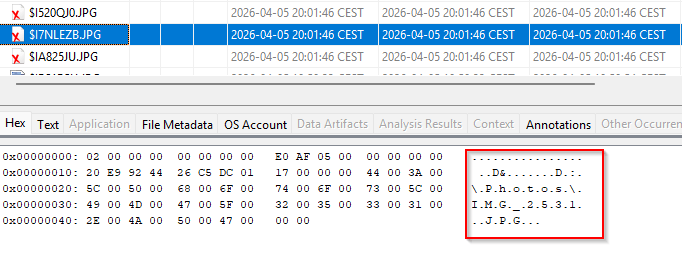
The /w switch overwrites unallocated clusters on the volume, effectively destroying the deleted file content that carving tools rely on. However, NTFS stores additional metadata in structures such as the Master File Table (MFT), directory indexes, and journal records. These structures may still retain deleted file names, timestamps, and other artifacts until they are eventually reused by the file system. In other words, cipher /w is highly effective at removing the recoverable file content, but it does not guarantee the removal of all forensic traces at the metadata level.
That distinction matters.
For most enterprise use cases, preventing recovery of the actual file content is the primary goal, and cipher achieves that very well. But in investigations or high-assurance sanitation scenarios, it is important to understand that:
Metadata remnants such as file names may still persist temporarily within NTFS structures.
This is a perfect reminder that sanitizing data and eliminating forensic artifacts are not always the same thing.
When native is enough security
One of the biggest misconceptions in IT is that deleting a file means the data is gone. As this demo clearly showed, deleted files can remain fully recoverable long after the recycle bin has been emptied. That is exactly what makes cipher /w such an underrated native Windows capability. By overwriting all unallocated space in three passes, 0x00, 0xFF, and random data, it provides an effective way to sanitize deleted remnants on a volume without affecting active files. On traditional HDD-based storage, this makes forensic recovery of deleted content extremely difficult and, in most realistic enterprise scenarios, practically impossible.
The before-and-after video comparison makes the impact immediately visible: what was fully recoverable only moments earlier can no longer be reconstructed after the wipe. For common enterprise scenarios such as workstation redeployment, lab resets, internal device reuse, or secure data deletion, this level of sanitization is often more than sufficient.
The only important nuance remains the storage medium itself. While the overwrite process is highly reliable on HDDs, SSD wear leveling and flash remapping make physical overwrites less deterministic. In those cases, methods such as BitLocker key destruction, NVMe sanitize, or vendor-specific secure erase remain the additional choice when higher assurance is required.
The real takeaway here is simple: before investing in commercial wipe software, it is worth understanding what your existing platform can already do.
Sometimes the most effective security control is the one that has been quietly built into Windows all along.
As always, I hope this was informative and useful, until next time!
Indeed very useful, thanks a lot for the writeup and the demo!