While configuring a new Microsoft Active Directory Certificate Services (AD CS) environment on Windows Server 2025 in Azure, I ran into an unexpected problem while configuring certificate templates. The Certification Authority (CA) itself was working correctly and was configured to use the “Legacy Cryptographic Service Provider“. Cryptography API: Next Generation (CNG) was also functioning normally, and certificate templates could be created using the default settings and succesfully create certificates. But…
Issue
After opening a certificate template, I navigated to the Cryptography tab, and changed the Provider Category from, “Legacy Cryptographic Service Provider” to “Key Storage Provider“, the Certificate Templates console immediately returned:
“The device that is required by this cryptographic provider is not found on this system.“
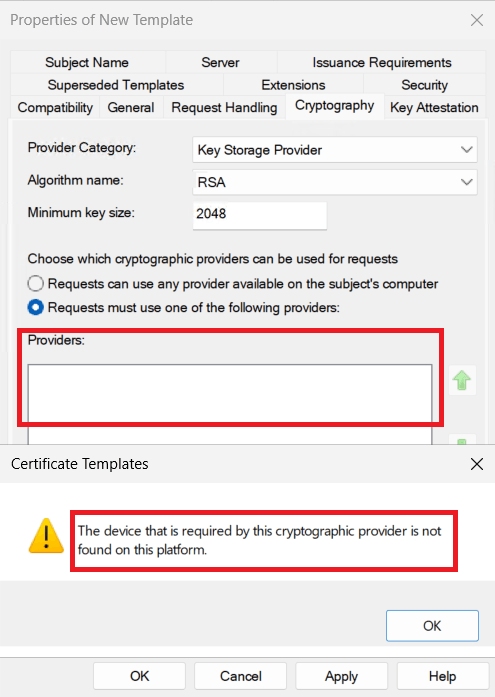
As a result, the Key Storage Provider configuration could not be opened at all. This also meant that perfectly functional providers such as the Microsoft Software Key Storage Provider could not be selected, preventing configuration of RSA (Rivest–Shamir–Adleman) or ECC (Elliptic Curve Cryptography)-based templates using CNG. The problem was reproducible across multiple certificate templates, including Kerberos Authentication and Web Server.
Troubleshooting
Starting to troubleshoot the issue, I wanted to rule out problems with AD CS, CNG, the certificate template itself, and the underlying Windows installation. Actually working through the possible causes one by one..
Verify the available cryptographic providers
The first step was to enumerate the Cryptographic Service Providers (CSP) and Key Storage Providers available on the server:
certutil -csplistWindows historically used Cryptographic Service Providers (CSPs) to provide applications with cryptographic functions such as key generation, storage, signing, and encryption. Microsoft later introduced Cryptography API: Next Generation (CNG), which uses Key Storage Providers (KSPs) for key storage and operations.
Moving a certificate template from a legacy CSP to a KSP enables the use of modern cryptographic algorithms and providers. This becomes particularly relevant when using Elliptic Curve Cryptography (ECC), for example ECDSA P-256, which requires CNG rather than the legacy CryptoAPI provider model.
The relevant providers included:
Microsoft Software Key Storage Provider
Microsoft Azure Integrated HSM Key Storage Provider
Microsoft Passport Key Storage Provider
Microsoft Platform Crypto Provider
Microsoft Smart Card Key Storage ProviderThe command eventually returned:
CertUtil: -csplist command FAILED: 0x80090030
NTE_DEVICE_NOT_READYThis initially looked relevant, but the same error occurred on a working Windows Server 2025 in my lab because the Microsoft Platform Crypto Provider had no TPM available. Therefore, NTE_DEVICE_NOT_READY from certutil -csplist itself was not the cause.
Verify the CNG Key Isolation service
Next, I verified that the CNG Key Isolation service was running:
Get-Service KeyIsoResult:
Status   Name    DisplayName
------   ----    -----------
Running KeyIso CNG Key IsolationVerify the CA cryptographic configuration
The CA itself was already using the Microsoft Software Key Storage Provider:
certutil -getreg CA\CSPRelevant configuration:
HKEY_LOCAL_MACHINE\SYSTEM\CurrentControlSet\Services\CertSvc\Configuration\Corp-Enterprise-CA\CSP:

Values:
  ProviderType             REG_DWORD = 0
  Provider                 REG_SZ = Microsoft Software Key Storage Provider
  HashAlgorithm            REG_DWORD = ffffffff (-1)
    CALG_OID_INFO_CNG_ONLY

  CNGPublicKeyAlgorithm    REG_SZ = RSA
  CNGHashAlgorithm         REG_SZ = SHA256

  MachineKeyset            REG_DWORD = 1
CertUtil: -getreg command completed successfully.This ruled out a legacy CSP configuration of the CA itself.
Check TPM and Secure Boot
Because hardware-backed providers were present, I also checked the TPM:
Get-TpmThe Azure VM did not have a TPM available:
TpmPresent : False
TpmReady : FalseThe system was running UEFI, I used:
Get-ComputerInfo | Select-Object BiosFirmwareTypebut Secure Boot was disabled, I used:
Confirm-SecureBootUEFINeither turned out to be relevant to the Microsoft Software KSP or ECDSA functionality.
Verify that the Microsoft Software KSP works
Next, I enumerated the keys available through the Microsoft Software Key Storage Provider:
certutil -csp "Microsoft Software Key Storage Provider" -keyThe CA key and other RSA keys were available. More importantly, I could generate an ECDSA certificate request successfully by using certreq:
[Version]
Signature="$Windows NT$"

[NewRequest]
Subject = "CN=ECDSA Test"
KeyAlgorithm = ECDSA_P256
ProviderName = "Microsoft Software Key Storage Provider"
MachineKeySet = TRUE
Exportable = TRUE
RequestType = PKCS10
HashAlgorithm = SHA256certreq -new ecdsa.inf test.reqWith a succesful result and an ECDSA key was also visible through the Software KSP:
certutil -csp "Microsoft Software Key Storage Provider" -key -userincluding:
ECDSA_P256
ECDSAAt this point, CNG, the Software KSP and ECDSA itself were clearly functional. The problem appeared to be limited to the Certificate Templates interface.
Identifying the core issue
The next step was listing the available cryptographic providers again on both the Azure based and a local server in my local lab (certutil -csplist). The comparison between the two, pointed me toward the Microsoft Azure Integrated HSM Key Storage Provider, which was present on the Azure Marketplace image but not on the clean Windows Server 2025 installation. I traced its CNG provider in the registry and found that it referenced azihsmksp.dll:
HKLM\SYSTEM\CurrentControlSet\Control\Cryptography\Providers\
Microsoft Azure Integrated HSM Key Storage Provider\UM

Image = azihsmksp.dllTo verify that Certificate Templates MMC actually interacted with this component, I captured the operation with Process Monitor (ProcMon) while reproducing the issue. The trace showed mmc.exe accessing and successfully loading:
C:\Windows\System32\azihsmksp.dllInterestingly, ProcMon did not show a failed DLL load or an obvious file or registry access error. The DLL loaded successfully, which shifted the investigation away from a missing or corrupt library and toward the behavior of the KSP itself after loading. On the Azure system the dll had these properties:
FileVersion    : 3.2.57-0
ProductVersion : 3.2.57-0On the clean Hyper-V installation, azihsmksp.dll was not present (which makes sense for a server that’s not running in Azure).
Inspect the Azure Integrated HSM KSP registration
The provider was registered here:
HKLM\SYSTEM\CurrentControlSet\Control\Cryptography\Providers\
Microsoft Azure Integrated HSM Key Storage ProviderThe complete registration was surprisingly small:
Get-ChildItem `
"HKLM:\SYSTEM\CurrentControlSet\Control\Cryptography\Providers\Microsoft Azure Integrated HSM Key Storage Provider" `
-RecurseResult:
Microsoft Azure Integrated HSM Key Storage Provider
└── UM
├── Image = azihsmksp.dll
└── 00010001
├── Flags = 1
└── Functions = KEY_STORAGETest the provider registration
Before changing anything, I exported the registry configuration using:
reg export "HKLM\SYSTEM\CurrentControlSet\Control\Cryptography\Providers\Microsoft Azure Integrated HSM Key Storage Provider" C:\Temp\AzureHSMKSP.regI then removed the provider registration:
reg delete "HKLM\SYSTEM\CurrentControlSet\Control\Cryptography\Providers\Microsoft Azure Integrated HSM Key Storage Provider" /fThe DLL itself was not removed. After rebooting the server, Certificate Templates worked normally and Key Storage Provider could be selected again. To verify that this was not coincidental, the exact registry configuration was restored:
reg import C:\Temp\AzureHSMKSP.regAfter another reboot, the Certificate Templates error immediately returned. Removing the provider registration again restored functionality. This provided a reproducible A/B test:
Azure Integrated HSM KSP registered
↓
Certificate Templates fails
Provider registration removed
↓
Certificate Templates works
Provider registration restored
↓
Certificate Templates fails againTest the provider directly through CNG
The final step was to determine exactly what happens when Windows interacts with the Azure Integrated HSM KSP. The PowerShell script below calls the native CNG APIs directly. It first calls NCryptOpenStorageProvider() and, if successful, calls NCryptEnumAlgorithms().
if (-not ("NCryptEnumTest" -as [type])) {
Add-Type @"
using System;
using System.Runtime.InteropServices;
public static class NCryptEnumTest
{
[StructLayout(LayoutKind.Sequential, CharSet = CharSet.Unicode)]
public struct NCryptAlgorithmName
{
[MarshalAs(UnmanagedType.LPWStr)]
public string pszName;
public int dwClass;
public int dwAlgOperations;
public int dwFlags;
}
[DllImport("ncrypt.dll", CharSet = CharSet.Unicode)]
public static extern int NCryptOpenStorageProvider(
out IntPtr phProvider,
string pszProviderName,
int dwFlags
);
[DllImport("ncrypt.dll")]
public static extern int NCryptEnumAlgorithms(
IntPtr hProvider,
int dwAlgOperations,
out int pdwAlgCount,
out IntPtr ppAlgList,
int dwFlags
);
[DllImport("ncrypt.dll")]
public static extern int NCryptFreeBuffer(
IntPtr pvInput
);
[DllImport("ncrypt.dll")]
public static extern int NCryptFreeObject(
IntPtr hObject
);
}
"@
}
function ConvertTo-HexStatus {
param (
[Parameter(Mandatory)]
[int]$Status
)
$unsignedStatus = [BitConverter]::ToUInt32(
[BitConverter]::GetBytes($Status),
0
)
return ('0x{0:X8}' -f $unsignedStatus)
}
$providerName = "Microsoft Azure Integrated HSM Key Storage Provider"
$provider = [IntPtr]::Zero
$algorithmList = [IntPtr]::Zero
$count = 0
$openResult = [NCryptEnumTest]::NCryptOpenStorageProvider(
[ref]$provider,
$providerName,
0
)
$openResultHex = ConvertTo-HexStatus -Status $openResult
Write-Host ""
Write-Host "NCryptOpenStorageProvider" -ForegroundColor Cyan
Write-Host "Provider : $providerName"
Write-Host "Result : $openResultHex"
Write-Host "Result decimal : $openResult"
Write-Host "Provider open : $($provider -ne [IntPtr]::Zero)"
Write-Host ""
if ($openResult -ne 0) {
throw "NCryptOpenStorageProvider failed with $openResultHex"
}
try {
$enumResult = [NCryptEnumTest]::NCryptEnumAlgorithms(
$provider,
0,
[ref]$count,
[ref]$algorithmList,
0
)
$enumResultHex = ConvertTo-HexStatus -Status $enumResult
Write-Host "NCryptEnumAlgorithms" -ForegroundColor Cyan
Write-Host "Result : $enumResultHex"
Write-Host "Result decimal : $enumResult"
Write-Host "Algorithm count : $count"
Write-Host "Buffer returned : $($algorithmList -ne [IntPtr]::Zero)"
Write-Host ""
if (
$enumResult -eq 0 -and
$algorithmList -ne [IntPtr]::Zero -and
$count -gt 0
) {
$structType = [NCryptEnumTest+NCryptAlgorithmName]
$structSize = [Runtime.InteropServices.Marshal]::SizeOf($structType)
Write-Host "Supported algorithms" -ForegroundColor Cyan
Write-Host ""
for ($i = 0; $i -lt $count; $i++) {
$itemPointer = [IntPtr]::Add(
$algorithmList,
$i * $structSize
)
$algorithm = [Runtime.InteropServices.Marshal]::PtrToStructure(
$itemPointer,
$structType
)
[PSCustomObject]@{
Name = $algorithm.pszName
Class = $algorithm.dwClass
Operations = ('0x{0:X8}' -f $algorithm.dwAlgOperations)
Flags = ('0x{0:X8}' -f $algorithm.dwFlags)
}
}
}
elseif ($enumResult -eq 0) {
Write-Warning "NCryptEnumAlgorithms succeeded but returned no algorithms."
}
else {
Write-Warning "NCryptEnumAlgorithms failed with $enumResultHex"
}
}
finally {
if ($algorithmList -ne [IntPtr]::Zero) {
[void][NCryptEnumTest]::NCryptFreeBuffer($algorithmList)
}
if ($provider -ne [IntPtr]::Zero) {
[void][NCryptEnumTest]::NCryptFreeObject($provider)
}
}The result was the missing piece:
NCryptOpenStorageProvider
Provider : Microsoft Azure Integrated HSM Key Storage Provider
Result : 0x00000000
Result decimal : 0
Provider open : True
NCryptEnumAlgorithms
Result : 0x80090035
Result decimal : -2146893771
Algorithm count : 0
Buffer returned : False
WARNING: NCryptEnumAlgorithms failed with 0x80090035The provider therefore loads successfully, but querying its supported algorithms fails with:
0x80090035Using certutil -error 0x80090035, gave me a “NTE_DEVICE_NOT_FOUND”, that also matches the error presented by the MMC Certificate Templates interface: “The device that is required by this cryptographic provider is not found on this system.“
At this point, the issue could be traced back to the interaction between the Certificate Templates MMC and the registered Microsoft Azure Integrated HSM KSP. This led me to conclude that when one provider cannot enumerate its algorithms because its required device is unavailable, Certificate Templates MMC prevents configuration of the otherwise functional Key Storage Providers, a.k.a a bug…
Cause
The Azure Windows Server 2025 image contains an additional registered CNG provider: “Microsoft Azure Integrated HSM Key Storage Provider” that’s used to communicated to the High Security Module (HSM) backend. The provider is registered under:
HKLM\SYSTEM\CurrentControlSet\Control\Cryptography\Providers\
Microsoft Azure Integrated HSM Key Storage Provider
The provider itself could be opened successfully using the Windows CNG API:
NCryptOpenStorageProvider()

Result: 0x00000000
Provider opened: TrueThe problem appeared when querying the algorithms supported by the provider:
NCryptEnumAlgorithms()

Result:          0x80090035
Algorithm count: 0
Buffer returned: False0x80090035 corresponds to (use certutil -error 0x80090035):
0x80090035 (-2146893771 NTE_DEVICE_NOT_FOUND) -- 2148073525 (-2146893771) Error message text: The device that is required by this cryptographic provider is not found on this platform.In other words, Windows can load and open the Azure Integrated HSM KSP, but enumeration of its cryptographic algorithms fails because the required backing device is unavailable. The Certificate Templates MMC snap-in appears not to isolate this failure to the affected provider. Instead, the failure prevents the provider selection from being populated at all. This also explains the otherwise rather confusing error presented by the GUI.
Solution
Removing the registration of the Microsoft Azure Integrated HSM Key Storage Provider restored normal Certificate Templates MMC functionality. Before making any changes, export the provider registration:
reg export "HKLM\SYSTEM\CurrentControlSet\Control\Cryptography\Providers\Microsoft Azure Integrated HSM Key Storage Provider" C:\Temp\AzureHSMKSP.regThen remove the registration:
reg delete "HKLM\SYSTEM\CurrentControlSet\Control\Cryptography\Providers\Microsoft Azure Integrated HSM Key Storage Provider" /fAfter restarting the server, Certificate Templates MMC could again switch to Key Storage Provider, and its supported algorithms were available as expected.
As a validation test, restoring the exact same registry registration and restarting the server caused the problem to immediately return. Removing it again restored functionality. To restore the functionality, use:
reg import C:\Temp\AzureHSMKSP.regImportant: this should currently be considered a workaround rather than an official fix. Removing a registered cryptographic provider may affect functionality that depends on that provider.
Until next time!
Update 31-07-2026: A user on LinkedIn pointed me to this GitHub issue, very similar in nature. https://github.com/microsoft/AziHSM-Guest/issues/22
Leave a Reply