If you’ve ever worked with Microsoft Active Directory Certificate Services (AD CS), you’ve probably come across the Certificate Enrollment Policy Web Service (CEP) and the Certificate Enrollment Web Service (CES). While Microsoft provides documentation on both services, I often notice that the focus is on how to install them rather than why they exist and how they fit into the bigger picture.
When I started diving into CEP and CES myself, I quickly discovered that understanding the architecture is far more important than simply clicking through an installation wizard. Why are there two separate web services? What problem were they designed to solve? What are XCEP and WSTEP? And when should you actually consider deploying CEP and CES instead of relying on traditional certificate enrollment?
In this article, I’ll answer those questions before touching a single PowerShell command or installation wizard. We’ll start by looking at the limitations of traditional certificate enrollment, explore the Microsoft architecture behind CEP and CES, and follow the complete communication flow from the client all the way to the Certification Authority.
By the end of this article, you should have a solid understanding of what each component does, why it exists, and when it makes sense to use it. In the following articles of this series, we’ll build on that foundation by installing, automating, troubleshooting, and eventually creating a highly available CEP/CES deployment entirely with PowerShell.
So, before we start building anything, let’s first answer the most important question: Why did Microsoft create CEP and CES in the first place?
Microsoft Certificate Enrollment Services series
This article is part of a series covering Microsoft Certificate Enrollment Services from architecture and deployment to high availability and troubleshooting.
- Part 1 – Understanding the Architecture
- Part 2 – Installing the Certificate Enrollment Policy Web Service (CEP)
- Part 3 – Installing the Certificate Enrollment Web Service (CES)
- Part 4 – Using Certificate Enrollment Services in Practice
- Part 5 – Building a Highly Available CEP/CES Infrastructure
Traditional certificate enrollment
Before I dive into CEP and CES, it’s important to understand how certificate enrollment works in a traditional Active Directory environment.
For many organizations, the default Active Directory Certificate Services (AD CS) deployment works perfectly. Domain-joined Windows computers automatically discover Enterprise Certification Authorities (CAs), retrieve available certificate templates from Active Directory, and request certificates using native Windows protocols. In many cases, administrators don’t even have to think about the underlying communication because everything happens automatically through Group Policy and Auto Enrollment. From a high level, the process looks like this:
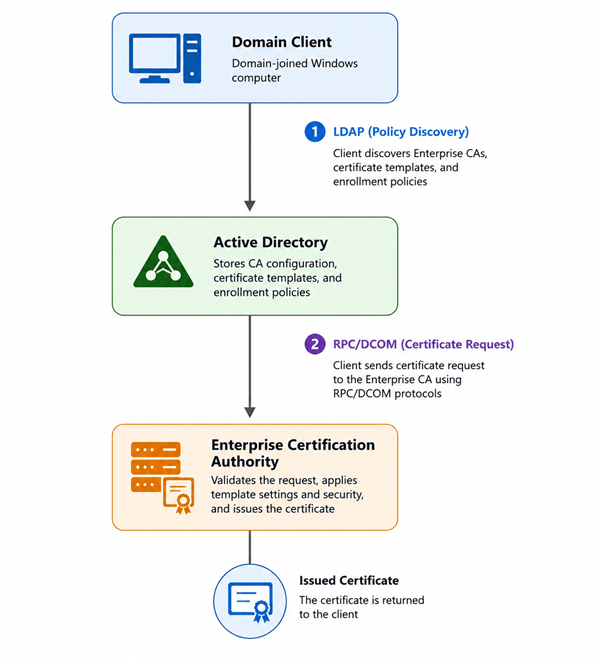
Although this process appears simple, two different communication paths are involved.
The first is policy discovery. A domain-joined client queries Active Directory to determine which Enterprise CAs are available, which certificate templates it is allowed to enroll for, and which enrollment methods are supported. This information is stored within Active Directory and is retrieved over LDAP.
The second step is the actual certificate enrollment. Once the client knows which template to use and which CA should issue the certificate, it communicates directly with the Certification Authority using Microsoft’s native RPC/DCOM protocols. The CA processes the request, applies the template settings and security permissions, and returns the issued certificate to the client.
This architecture has been part of Active Directory Certificate Services for many years and remains the preferred approach for domain-joined Windows systems inside a trusted corporate network. It is fast, efficient, and tightly integrated with Active Directory. However, this design also introduces a number of assumptions:
- The client must be able to communicate with Active Directory.
- The client must be able to reach the Certification Authority using RPC/DCOM.
- Firewall rules must allow the required ports.
- The client is typically domain joined and capable of authenticating using Kerberos.
As long as these assumptions hold true, the traditional enrollment process works extremely well. But what happens when they don’t? What if the client is located in a DMZ, connected over the internet, or simply not joined to the Active Directory domain? Opening RPC/DCOM through firewalls is rarely desirable, and workgroup systems cannot rely on the same discovery mechanisms as domain-joined devices. These limitations ultimately led Microsoft to introduce two new web services: the Certificate Enrollment Policy Web Service (CEP) and the Certificate Enrollment Web Service (CES).
In the next chapter, I’ll take a closer look at these challenges and see why Microsoft decided to replace LDAP and RPC/DCOM with standards-based HTTPS communication.
The challenge with traditional certificate enrollment
The traditional Active Directory Certificate Services enrollment model has served organizations extremely well for many years. For domain-joined Windows computers inside a trusted corporate network, it remains the preferred and most efficient method for requesting certificates. However, modern IT environments look very different from the networks that existed when Active Directory Certificate Services was originally introduced.
Organizations now deploy workloads in multiple locations and across different security boundaries. Web servers are often placed in DMZ networks, cloud-hosted virtual machines may not be joined to the corporate domain, and many devices connect remotely over the internet without direct access to internal Active Directory services. These scenarios expose the limitations of the traditional enrollment model.
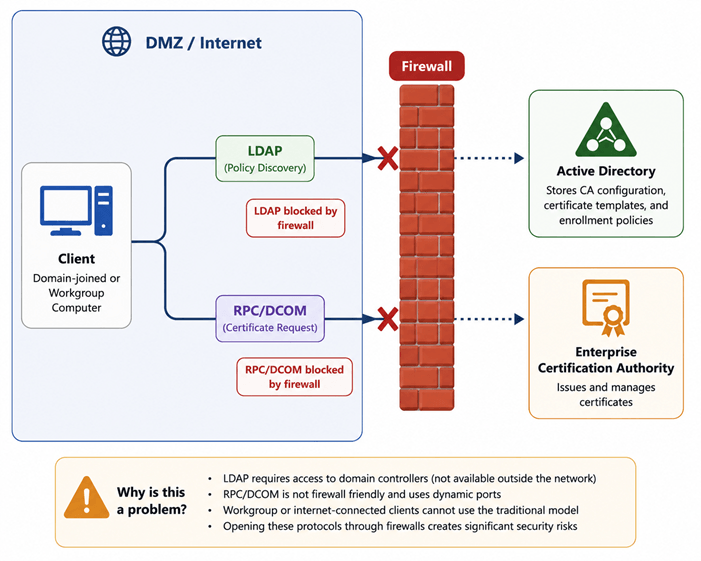
The first challenge is policy discovery. Domain-joined clients retrieve certificate templates, Certification Authority information and enrollment configuration directly from Active Directory using LDAP. If a client cannot communicate with a domain controller, this discovery process immediately fails.
The second challenge is the enrollment protocol itself. After selecting a certificate template, the client communicates directly with the Certification Authority using Microsoft’s native RPC/DCOM protocols. While this works extremely well inside a trusted network, RPC/DCOM was never designed to traverse firewalls or operate securely across network boundaries. Opening the required ports between security zones is rarely desirable and often prohibited by security policies.
Authentication presents another challenge. Traditional enrollment assumes the client can authenticate using Kerberos against Active Directory. This assumption quickly breaks down for workgroup computers, isolated networks, business partners, or systems that simply cannot become members of the Active Directory domain.
As organizations adopted cloud computing, internet-facing services and increasingly segmented networks, these limitations became more apparent. Administrators needed a way to securely request certificates without exposing LDAP, RPC/DCOM or domain controllers beyond trusted network boundaries. This is exactly the problem Microsoft set out to solve. Instead of requiring clients to communicate directly with Active Directory and the Certification Authority, Microsoft introduced two dedicated web services that expose the same functionality over HTTPS. By replacing LDAP and RPC/DCOM with secure web services, certificate enrollment became possible across firewalls, DMZs, workgroup environments and other previously unsupported scenarios without fundamentally changing how Active Directory Certificate Services operates.
Those two services are the Certificate Enrollment Policy Web Service (CEP) and the Certificate Enrollment Web Service (CES).
In the next chapter, I’ll examine the architecture behind these two services and see how Microsoft separated policy discovery from certificate enrollment to create a more flexible and firewall-friendly solution.
Understanding XCEP
With the challenges of traditional certificate enrollment now clear, it’s time to take a closer look at the first component Microsoft introduced: the Certificate Enrollment Policy Web Service (CEP). The protocol used by CEP is called XCEP, which stands for XML Certificate Enrollment Policy. As the name suggests, XCEP is not responsible for requesting or issuing certificates. Instead, it provides clients with the information they need before a certificate request can even be created. Think of XCEP as the discovery mechanism of Microsoft’s web enrollment architecture. When a client connects to a CEP server, it asks questions such as:
- Which Certification Authorities (CAs) are available?
- Which certificate templates am I allowed to enroll for?
- Which enrollment web service should I use?
- Which authentication methods are supported?
- Which policy settings apply to me?
The CEP server does not generate this information itself. Instead, it retrieves the relevant policy information from Active Directory and presents it to the client over HTTPS using the XCEP protocol. This means that XCEP acts as a secure translation layer between clients and Active Directory. Instead of requiring direct LDAP connectivity to a domain controller, clients can obtain the same enrollment policy information through a standard HTTPS connection. From a high-level perspective, the communication flow looks like this:
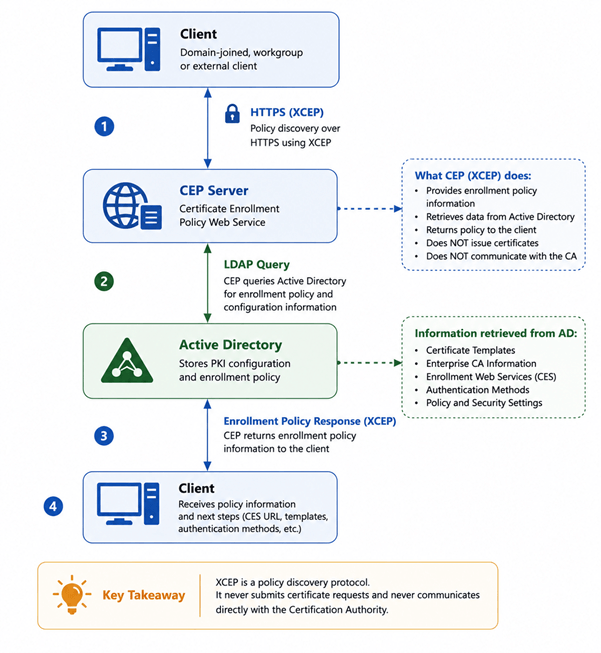
Notice what is not happening, at no point is a certificate request sent to the Certification Authority, no private key is generated, no certificate is issued. XCEP simply answers the question:
“Based on who I am, what certificates am I allowed to request, and where should I send that request?“
This separation between policy discovery and certificate enrollment is one of the key design principles behind Microsoft’s web enrollment architecture. Once the client has obtained the necessary policy information through XCEP, it can contact the appropriate Certificate Enrollment Web Service (CES) using the WSTEP protocol to submit the actual certificate request. In other words:
- XCEP tells the client what it can request.
- WSTEP is responsible for requesting the certificate.
Understanding this distinction is important, as it explains why a functioning CEP server alone is not enough to issue certificates. Without a corresponding CES server, clients can successfully retrieve enrollment policies but have nowhere to submit their certificate requests.
Understanding WSTEP
In the previous chapter, I explained that XCEP is responsible for policy discovery. It tells clients which certificate templates are available, which Certification Authorities can issue them, and which enrollment service should be used. However, XCEP intentionally stops there. Once the client has obtained the required enrollment policy, it still needs a way to submit the actual certificate request. This is where WSTEP, the Web Services Trust Enrollment Protocol, comes into play.
Unlike XCEP, WSTEP is responsible for the certificate enrollment process itself. The client first generates a Certificate Signing Request (CSR), either locally or through the Windows certificate enrollment APIs. This request contains the public key, certificate template information, and any additional attributes required by the template. Instead of sending the request directly to the Certification Authority using RPC/DCOM, the client submits the request over HTTPS to the Certificate Enrollment Web Service (CES) using the WSTEP protocol.
The CES server acts as a trusted intermediary between the client and the Enterprise Certification Authority. After authenticating the client and validating the request, CES forwards the enrollment request to the Certification Authority using Microsoft’s native RPC/DCOM interfaces. The Certification Authority processes the request exactly as it would for any other domain client, applies the template configuration and security permissions, issues the certificate, and returns the result to CES. CES then returns the issued certificate to the client over the same HTTPS connection.
From the client’s perspective, certificate enrollment now takes place entirely over HTTPS, while the internal communication between CES and the Certification Authority continues to use the native AD CS interfaces. The communication flow can be summarized as follows:
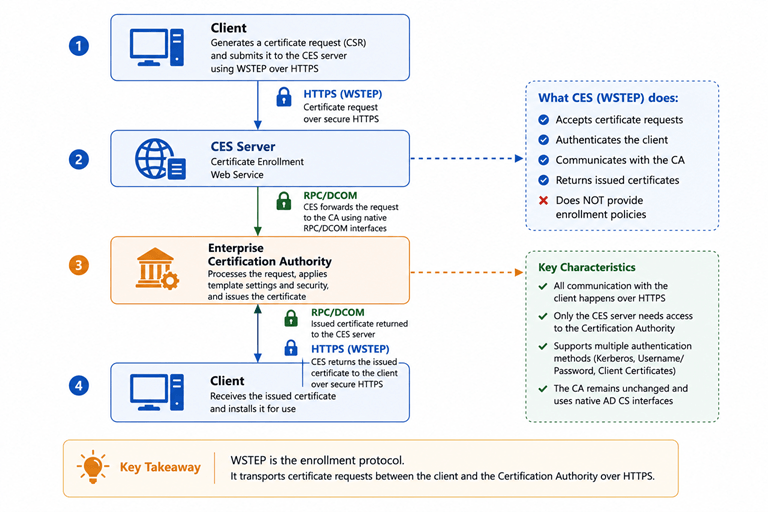
This separation provides several important advantages:
- The client no longer requires direct RPC/DCOM connectivity to the Certification Authority.
- Only the CES server needs access to the Certification Authority.
- Authentication can be performed using Kerberos, Username/Password or Client Certificates, making certificate enrollment possible for both domain-joined and non-domain-joined devices.
Perhaps the most important design decision is that the Certification Authority itself remains unchanged. From the CA’s perspective, every request still arrives through the standard Microsoft enrollment interfaces. CES simply acts as a secure HTTPS gateway between external clients and the internal Certification Authority. Together, XCEP and WSTEP form Microsoft’s complete web enrollment architecture. So I repeat,
- XCEP answers the question: What am I allowed to request?
- WSTEP answers the question: Here is my certificate request.
Authentication
At this point, I’ve shown how Microsoft separated policy discovery (XCEP) from certificate enrollment (WSTEP). Both protocols use HTTPS, making certificate enrollment possible across firewalls and network boundaries. However, before a client can retrieve an enrollment policy or request a certificate, the server must first answer an important question: Who is the client?
The answer determines which certificate templates are available, whether the client is authorized to request a certificate, and which Certification Authority is allowed to process the request. Unlike traditional Active Directory enrollment, where authentication is almost always performed using Kerberos, Microsoft designed CEP and CES to support multiple authentication mechanisms. This flexibility allows certificate enrollment to work in a much wider range of environments.
The supported authentication methods are:
| Kerberos | Username/Password | Client Certificate | |
|---|---|---|---|
| Domain Joined | Yes | Yes | Yes |
| Workgroup | No | Yes | Yes |
| Internet | No | Yes | Yes |
| Passwordless | No | No | Yes |
| Renewal | No | Yes | Yes |
Each authentication method has its own strengths and is designed for different deployment scenarios.
Kerberos authentication
Kerberos is the preferred authentication method for domain-joined Windows computers. The client authenticates using its existing Active Directory credentials, providing a seamless user experience without requiring additional prompts for credentials. Because Kerberos relies on Active Directory, it is only suitable for systems that are joined to the domain and have connectivity to a domain controller.
Username and password authentication
Username/password authentication is commonly used when Kerberos is not available. Typical examples include workgroup servers, DMZ environments, isolated networks, or systems that cannot become members of the Active Directory domain. The client simply provides valid Active Directory credentials over the secured HTTPS connection. The CEP or CES server authenticates the user and applies the same authorization rules that would normally be enforced for a domain-joined client.
Client certificate authentication
The third option is certificate-based authentication. Instead of authenticating with a username or Kerberos ticket, the client presents an existing client authentication certificate during the TLS handshake. This authentication method is often used for certificate renewal scenarios, smart card deployments, or environments where passwords are undesirable or prohibited. One common question is where this initial certificate comes from? The answer depends on the deployment. In many environments, an initial certificate is issued through another enrollment method, after which future renewals can be performed using certificate authentication. This creates a seamless certificate lifecycle without requiring passwords or Kerberos for subsequent enrollments.
Choosing the right authentication method
There is no universally “best” authentication method. The appropriate choice depends entirely on the environment.
- Kerberos is ideal for internal, domain-joined clients.
- Username and Password provides maximum compatibility for workgroup and externally connected systems.
- Client Certificate Authentication offers the highest level of automation and is often used for certificate renewal and passwordless scenarios.
One of the strengths of Microsoft Certificate Enrollment Services is that all three authentication methods are supported while using the same underlying XCEP and WSTEP architecture, or machine for that matter.
Getting curious? In the following articles we’ll configure all three authentication methods, explain the required IIS and Active Directory configuration, and demonstrate how each authentication mechanism behaves during certificate enrollment.
Practical use cases
At this point, you might be wondering whether you actually need Certificate Enrollment Policy Web Services (CEP) and Certificate Enrollment Web Services (CES) in your own environment. The answer is simple, If all of your Windows devices are domain joined, located inside your corporate network, and can communicate directly with both Active Directory and the Certification Authority, then the traditional Active Directory Certificate Services enrollment model is usually the best choice. CEP and CES were never designed to replace traditional certificate enrollment. Instead, they were introduced to solve scenarios where the traditional enrollment model is no longer practical.
Let’s look at some of the most common deployment scenarios.
Workgroup computers
Perhaps the most common use case is certificate enrollment for workgroup computers. Because these systems are not joined to Active Directory, they cannot use Kerberos authentication or discover enrollment policies through LDAP. By exposing CEP and CES over HTTPS, workgroup computers can still authenticate using Active Directory credentials or an existing client certificate and successfully request certificates from an Enterprise Certification Authority.
DMZ servers
Many organizations place web servers, reverse proxies and application servers inside a DMZ. Allowing these systems direct LDAP access to domain controllers or RPC/DCOM connectivity to the Certification Authority is rarely considered good security practice. Deploying CEP and CES allows certificate enrollment over a single HTTPS connection while keeping domain controllers and Certification Authorities safely inside the internal network.
Internet-facing systems
Organizations increasingly deploy workloads outside their traditional network perimeter. Whether hosted in Azure, another cloud provider, or remote datacenters, these systems often cannot communicate directly with internal Active Directory services. Publishing CEP and CES through a reverse proxy enables secure certificate enrollment over HTTPS without exposing native Windows management protocols to the internet.
Certificate renewal
Certificate authentication enables a particularly elegant enrollment model. Instead of authenticating with a username and password every time, a client can use its existing client authentication certificate to request a renewed certificate. This minimizes administrative overhead and enables automated certificate lifecycle management.
Smart Cards and passwordless authentication
Certificate-based authentication is also commonly used in smart card environments and passwordless deployments. Once an initial certificate has been issued, subsequent certificate renewals can be performed without relying on passwords, making this approach attractive for high-security environments and closely resembles Passwordless authentication .
Third-Party enrollment gateways
Another interesting scenario involves third-party Public Key Infrastructure solutions. Several commercial PKI platforms use the same architectural concept by exposing certificate enrollment over HTTPS while communicating with an Enterprise Certification Authority on the back end. One example is the Entrust Certificate Enrollment Gateway (CEG), which also uses the WSTEP protocol to integrate Windows clients with an Enterprise PKI. Although the implementation differs, the overall architecture is remarkably similar to Microsoft’s Certificate Enrollment Services.
When should you deploy CEP and CES?
The decision ultimately comes down to one question: “Can your clients safely communicate with Active Directory and the Certification Authority using LDAP and RPC/DCOM?“. If the answer is yes, the traditional enrollment model is usually the simplest and most efficient solution.
If the answer is no, Certificate Enrollment Services provides a secure HTTPS-based alternative that preserves the Enterprise CA while extending certificate enrollment beyond the traditional Active Directory network boundaries. Rather than replacing Active Directory Certificate Services, CEP and CES extend it to support modern deployment scenarios.
End-to-End enrollment flow
Now that I’ve covered the architecture, protocols, authentication methods, and common deployment scenarios, let’s put everything together by following the complete certificate enrollment process from start to finish.
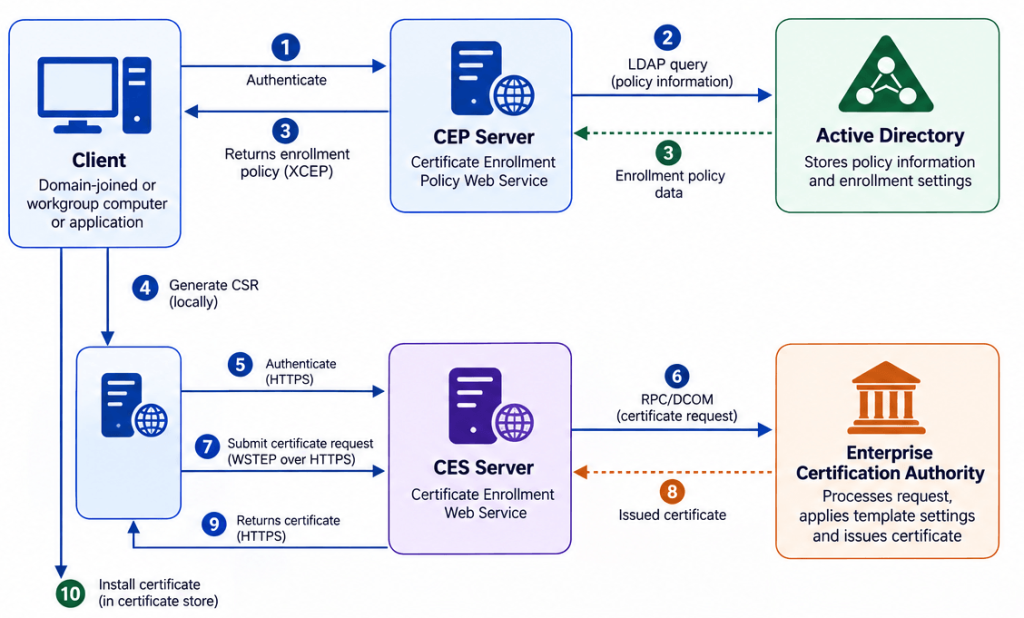
- The client authenticates to the Certificate Enrollment Policy Web Service (CEP).
- The CEP server queries Active Directory using LDAP to retrieve the applicable enrollment policy.
- The CEP server returns the enrollment policy to the client using the XCEP protocol.
- The client generates a Certificate Signing Request (CSR) locally based on the selected certificate template.
- The client authenticates to the Certificate Enrollment Web Service (CES).
- The client submits the certificate request to CES using the WSTEP protocol over HTTPS.
- CES forwards the certificate request to the Enterprise Certification Authority using Microsoft’s native RPC/DCOM interfaces.
- The Enterprise Certification Authority validates the request, applies the certificate template configuration and issues the certificate.
- CES returns the issued certificate to the client over the existing HTTPS connection.
- The client installs the certificate into the appropriate certificate store, making it available for its intended purpose.
From the client’s perspective, the entire enrollment process is performed over HTTPS. Internally, however, the Enterprise Certification Authority continues to operate exactly as it always has, processing certificate requests through its native Microsoft enrollment interfaces. This separation between external HTTPS communication and internal Active Directory Certificate Services functionality is one of the key design principles behind Microsoft’s Certificate Enrollment Services architecture.
Final thoughts
Certificate Enrollment Policy Web Services (CEP) and Certificate Enrollment Web Services (CES) are often viewed as optional components of Active Directory Certificate Services. In reality, they address a very specific challenge: extending certificate enrollment beyond the traditional boundaries of Active Directory.
Although this architecture may initially appear more complex than traditional Active Directory enrollment, it provides the flexibility required for modern environments such as DMZ networks, workgroup computers, cloud-hosted workloads, and internet-facing services. Understanding the architecture is the first step. Once you understand the role of each component, installing and configuring CEP and CES becomes much more straightforward.
In the next article, I’ll move from theory to practice by deploying a complete Certificate Enrollment Policy Web Service (CEP) environment from scratch. We’ll configure IIS, create the required Active Directory objects, deploy a Group Managed Service Account (gMSA), configure authentication, validate the installation, and automate the entire deployment using PowerShell.
I hope this article has provided a solid foundation for understanding Microsoft’s Certificate Enrollment Services. As always, if you have questions, suggestions, or experiences of your own, I’d love to hear from you.
What about user based templates like Smime or any template where the subject is built from Active Directory?
Hi,
That continues to works, if the correct information is provided. Albeit, when talking about devices, those must be part of AD already. There’s no functional change compared to that.
You are writing about certificate enrollment for workstation computers. Which mechanism is responsible for automatically renewing certificates on such computers or other devices working outside AD? We can implement CEP and CES, but it would be good to enroll\renew certs automatically.
P.S. very good article 😉
For Windows workstations, Certificate Autoenrollment is the mechanism responsible for automatically requesting and renewing certificates. This functionality can also be used on workgroup or externally connected Windows devices by configuring the required settings through the Local Group Policy, including the Certificate Enrollment Policy pointing to the CEP service and enabling Autoenrollment. The initial certificate can, for example, be obtained through CEP/CES using username and password authentication. Once the device has a valid certificate and private key, Certificate Key-Based Renewal (KBR) can be used for subsequent renewals. An externally accessible CEP/CES configuration using certificate authentication can then authenticate the device based on its existing certificate instead of requiring credentials again. Autoenrollment monitors the certificate lifecycle and automatically initiates the renewal when required. This allows Windows devices outside the corporate network, including workgroup computers, to automatically renew their certificates without requiring VPN connectivity or direct access to Active Directory.