I know, I know, last time I promised that this blog post would be about renewing the issuing CA certificate, but I have something cool today as well. I ran into an issue with my lab CA that made me dive into a rabbit hole filled with advanced certutil commands and direct access to the database. Instead of treating this as an incident and forget all the commands I’ve used to view and alter information I thought I would share the information.
When working with Active Directory Certificate Services (AD CS), most people interact with the Certification Authority through the MMC console. It provides a clear view of issued certificates, pending requests, and revoked certificates. It’s the easiest way. However, behind that interface sits a database that’s per default located in the directory: “C:\WINDOWS\system32\CertLog” and has the name of your CA, in my case “Corp-Enterprise-CA.edb“.
What many admins do not realize is that you can query this database directly using the built-in certutil tool. With the right commands, certutil can behave almost like a lightweight database query interface.
Understanding the AD CS database
The Certification Authority database is not just a simple list of issued certificates. Internally, AD CS stores certificate lifecycle data in an “Extensible Storage Engine (ESE)” database, also known as Jet Blue. This is the same storage technology used by Active Directory, Exchange Server, and Windows Search. Alongside the database file you will typically find transaction logs and checkpoint files, such as “edb.log“, “edb.chk” and “edbxxxxx.log” alike files. These files allow the database engine to maintain consistency and recover from unexpected interruptions. Within the database, the Certification Authority maintains several logical tables that track the lifecycle of certificate requests and issued certificates. While these tables are not typically accessed directly by administrators, the most relevant ones include:
| Table | Purpose |
|---|---|
| Request | Stores incoming certificate requests |
| Cert | Stores issued certificates |
| CRL | Stores revocation information |
| Attrib | Stores request attributes |
| Extension | Stores certificate extensions |
Most of the queries performed with certutil -view operate against the Cert table, which contains the metadata associated with issued certificates.
Inspecting the database with built-in tools
While the Certification Authority console provides a graphical view (Use this whenever you can to avoid mistakes as much as possible), the database itself can also be inspected using several built-in tools.
certutil
Tip: Run certutil commands from CMD, powershell can give unexpected results.
The supported and recommended method for querying the CA database is:
certutil -viewThanks to Paulo (see the comment section) I now know how to view the database columns that can be used in a query, cool stuff!
certutil -schemaBased on the output of the schema, you can also query specific fields:
certutil -view -out "RequestID,SerialNumber,NotBefore,NotAfter,CertificateTemplate"or apply filters:
certutil -view -restrict "Disposition=20"In case you need to filter with different parameters, here are the options available:
| Disposition | Explanation |
|---|---|
| 9 | Pending Certificates |
| 20 | Issued Certificates |
| 21 | Revoked Certificates |
| 30 | Failed Certificates |
esentutl
For low-level inspection of the database itself, the esentutl utility can be used. This tool is part of Windows and can display database metadata and integrity information. You will need to stop the “CertSvc” service before you can use any of the commands. For example, to view database header information:
esentutl /mh C:\Windows\System32\CertLog\Corp-Enterprise-CA.edbTo check database integrity:
esentutl /g C:\Windows\System32\CertLog\Corp-Enterprise-CA.edb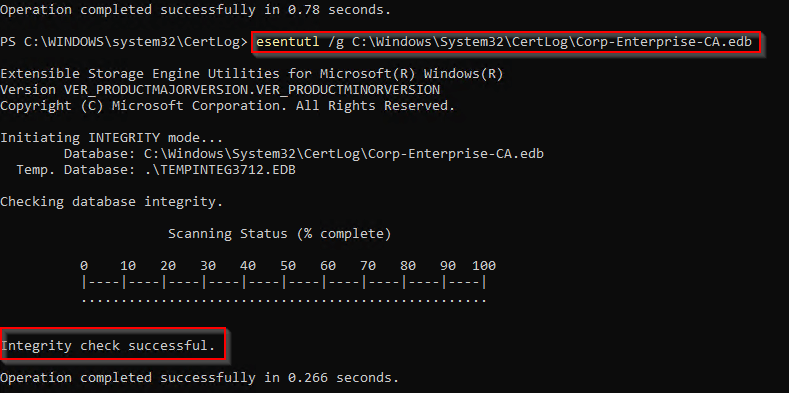
All operations for the utility are listed in the table below.
| Operation | Parameter |
|---|---|
| Defragmentation | /d |
| Recovery | /r |
| Integrity | /g |
| Checksum | /k |
| Repair | /p |
| File Dump | /m |
| Copy File | /y |
Note! executing the “esentutl” gives you a menu where some specific parameters will show additional information and options.
Important warning
Although the CA database can technically be inspected with tools like esentutl, directly modifying the database is strongly discouraged. The Certification Authority service expects the database, registry configuration, and certificate store to remain consistent. Manual changes to the database can easily corrupt the CA state or break certificate validation. If database-level maintenance ever becomes necessary, always ensure a backup exists first. A backup of the CA database and private key can be created using:
certutil -backupDB C:\CABackup
certutil -backupKey C:\CABackupOnly after a verified backup exists should any advanced troubleshooting or maintenance tasks be considered. In most cases, administrators should interact with the CA database only through supported tools such as:
- the Certification Authority console
certutil- PowerShell automation where possible
These interfaces ensure the integrity of the PKI environment remains intact.
Alright, let’s see what we cool commands we can use with certutil!
Certutil goodies
Finding certificates issued to a specific user
To locate certificates issued to a specific user:
certutil -view -restrict "RequesterName=corp\michael" -out "RequestID,RequesterName,SerialNumber,NotBefore,NotAfter,CertificateTemplate"Alternatively, depending on your environment, searching by subject fields may work better:
certutil -view -restrict "CommonName=Michael Waterman"or
certutil -view -restrict "UPN=michael@corp.example.com"Finding certificates issued during a specific period
Certificates issued during March 2026:
certutil -view -restrict "NotBefore>=03/01/2026,NotBefore<04/01/2026,Disposition=20"This can be useful during investigations or audits.
Listing revoked certificates
To list all revoked certificates:
certutil -view -restrict "Disposition=21"Example with additional fields:
certutil -view -restrict "Disposition=21" -out "RequestID,SerialNumber,NotBefore,NotAfter,CertificateTemplate"Exporting results for analysis
You can export the results to CSV for further analysis:
certutil -view -restrict "Disposition=20" -out "RequestID,RequesterName,SerialNumber,NotBefore,NotAfter,CertificateTemplate" csv > issued-certs.csvThis allows further analysis in Excel, PowerShell, or other tools.
Advanced queries
Once you get familiar with certutil queries, more advanced use cases become possible.
Finding certificates that will expire soon
certutil -view -restrict "NotAfter<01/01/2027,Disposition=20" -out "RequestID,RequesterName,SerialNumber,NotAfter,CertificateTemplate"This is useful for identifying certificates that require renewal.
Finding certificates issued with a specific template
certutil -view -restrict "CertificateTemplate=User" -out "RequestID,RequesterName,SerialNumber,NotBefore,NotAfter"This can help identify certificates issued from deprecated templates.
Finding certificates issued before a CA renewal
If your CA has been renewed multiple times, certificates issued before a specific renewal can be identified by their issuance date:
certutil -view -restrict "NotBefore<03/11/2026"This can be helpful when preparing for CA migrations or cleanup projects.
Additional useful certutil commands
While certutil -view is one of the most powerful ways to query the Certification Authority database, several other certutil commands can help you inspect the state of the CA. These commands provide insight into the CA configuration, database status, and certificate lifecycle.
Viewing CA configuration
To view the full Certification Authority configuration stored in the registry:
certutil -getreg CA\*This command returns configuration settings such as:
- CRL publication intervals
- database configuration
- CA certificate hashes
- certificate validity settings
For example, you can inspect CRL configuration settings with:
certutil -getreg CA\CRL*Viewing CA certificate generations
Certification Authorities that have been renewed multiple times maintain a list of CA certificate hashes in the registry. These can be viewed with:
certutil -getreg CA\CACertHashThe output shows all CA certificate generations that the CA is aware of. This information explains why older CA certificates and CRLs sometimes continue to appear even after renewal.
Inspecting the certification authority
You can retrieve detailed information about the Certification Authority itself with:
certutil -cainfoThis command provides information such as:
- CA certificate versions
- CRL numbers
- database statistics
- key container information
For troubleshooting PKI issues, this command can be extremely useful.
Generating a new CRL
To manually publish a new Certificate Revocation List:
certutil -crlThis forces the CA to generate and publish a new CRL immediately instead of waiting for the scheduled publication interval.
Republishing the CA certificate
In some situations the CA certificate files stored in the CertEnroll directory (C:\Windows\System32\CertSrv\CertEnroll) may be removed accidentally or become unavailable on the publication share.
certutil -config - -ca.cert "C:\Windows\System32\CertSrv\CertEnroll\Corp-Enterprise-CA.cer" 0Cleaning up old database entries
First a warning, be extremely careful with the following command, make sure you have a backup and validate that the command you execute actually targets the correct certificates.
Over time, the CA database can grow significantly in size. Old entries can be removed using the -deleterow command. For example, to remove certificate records older than a specific date:
certutil -deleterow 01/01/2020 certSimilarly, old revocation records can be removed:
certutil -deleterow 01/01/2020 crlFinal thoughts
Active Directory Certificate Services is often treated as a “black box”. In reality, the CA database contains a wealth of information that can be accessed using built-in tools. Understanding how to query the database with certutil provides administrators with a powerful way to investigate and manage their PKI environments. As always there’s more, much more than meets the eye when it comes down to using certutil, but for now these are my tips for interaction with the database.
Sometimes the most powerful tools are already built into the operating system, they just require a deeper look.
As always, please leave a comment or question, hope this was useful and until next time!
Running certutil -schema shows database columns available to query 🙂
That’s cool, I’ll add that as well. Thanks!
Done! Added your name as a reference.
Thanks! Keep up good work and spreading AD CS knowledge!
Thank you for sharing this wonderful information. What you shared is not easily found. You are the best.