One of the questions I get asked most often during assignments or workshops isn’t really about Certificate Revocation Lists (CRLs), OCSP, certificate templates or PKI in general. It’s much simpler than that.
“What’s a certificate anyway?”
Well actually, I sometimes start with the question, “So, can anyone explain to me what a certificate is or what it represents?”. You would think, it seems like an easy question to answer. Some people will tell you it’s your public key. Others will say it’s your digital identity. While both answers contain some truth, rarely the complete story is told. A digital certificate is much more than a single piece of information. It contains an identity, a public key, validity information, a collection of extensions, and much more. More importantly, all of that information is cryptographically protected by a trusted Certificate Authority (CA).
In other words, a certificate is a digitally signed document that binds an identity to a public key, with a couple of extensions. That digital signature allows anyone who trusts the issuing CA to verify that the certificate has not been modified and that the binding between the identity and the public key is authentic. But what exactly is inside a certificate? What does a Certificate Authority actually sign? And why does changing just a single character invalidate the entire certificate?
Let’s take a look under the hood of an X.509 certificate.
Looking at a certificate
The easiest way to understand what a certificate is, is to simply open one, let’s take the certificate of my blog for example, but really any certifictae will do. If you’ve ever worked with Windows (and I’ll bet you have), you’ve probably seen the Certificate Viewer before. It provides a human-readable representation of the information stored inside an X.509 certificate.
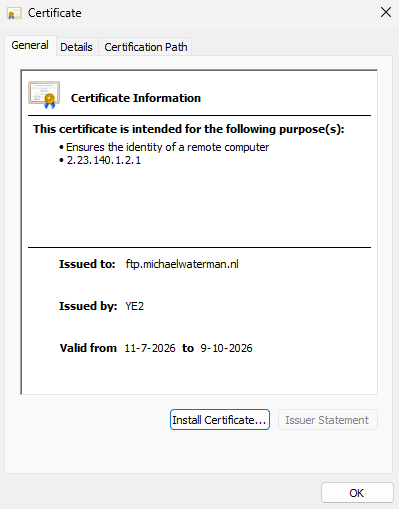
At first glance, the information appears fairly straightforward. You can immediately identify who the certificate belongs to, who issued it, and whether it is currently valid, you know, the common stuff. Switching to the Details tab reveals that a certificate contains much more than just a public key. Among the information you’ll find are:
- The Subject, which identifies the person, computer or service the certificate belongs to.
- The Issuer, identifying the Certificate Authority (CA) that issued the certificate.
- The certificate’s validity period, defining when it becomes valid and when it expires.
- The Subject Public Key, which contains the public key associated with the certificate.
- A collection of extensions, such as the Subject Alternative Name (SAN), Key Usage, Enhanced Key Usage (EKU), CRL Distribution Points (CDP), Authority Information Access (AIA), and many others.
Although this information may appear to be a simple collection of fields, it’s actually much more than that. Every one of these values contributes to the trustworthiness of the certificate and, as we’ll see in a moment, nearly all of them are protected by the digital signature of the issuing Certificate Authority.
Certificates are just data
Although the Certificate Viewer presents the information in a user-friendly format, a certificate is nothing more than a structured collection of data. Don’t believe me? Just save a certificate to the local file system and open it in notepad, there you’ll see the raw data itself. Just make sure that it’s saved as a pem (base64) format instead of the binary (der) format, otherwise you’ll see binary garbage.
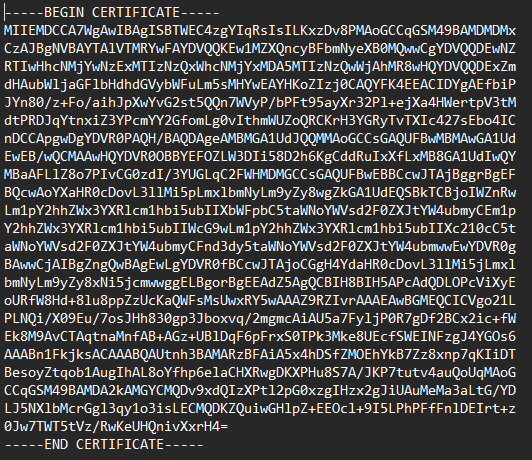
Every field you see in the Details tab is stored inside the certificate itself according to the X.509 standard. There is no hidden magic involved. A certificate simply contains information that describes an identity, the associated public key, the issuing Certificate Authority (CA), the validity period, and a number of optional extensions that define how the certificate can be used.
From a technical perspective, every X.509 certificate is defined using ASN.1 and encoded using DER (Distinguished Encoding Rules). Whether you store that certificate as a binary DER file or as a Base64-encoded PEM file doesn’t change the certificate itself, PEM is simply a textual representation of the same DER-encoded data. Because a certificate is structured data, we don’t have to rely solely on graphical tools such as the Windows Certificate Viewer. We can also inspect the raw contents directly from the command line. Windows includes the certutil utility, which allows us to examine every field contained within a certificate.
certutil -dump certificate.cerThe output contains the same information shown by the Certificate Viewer, but in a much more detailed format. This gives us our first look at how a certificate is actually organized internally. In the next section, we’ll take that one step further and look at the part of the certificate that the Certificate Authority actually signs.
Meet the TBSCertificate
In the previous sections, we’ve seen that a certificate contains much more than just a public key. It also includes information that identifies the certificate owner, defines who issued it, specifies when it is valid, and contains a variety of extensions that determine how the certificate may be used. Together, these pieces of information describe the identity of the certificate and the cryptographic key that belongs to it. You can think of a certificate as being built from three major building blocks:
- Identity information, such as the Subject and Subject Alternative Name (SAN), describing the person, computer or service the certificate represents.
- The Subject Public Key, containing the public key that belongs to that identity.
- Certificate metadata, including the validity period, serial number, issuer information and all certificate extensions such as Key Usage, Enhanced Key Usage (EKU), CRL Distribution Points (CDP), Authority Information Access (AIA), Certificate Policies and many others.
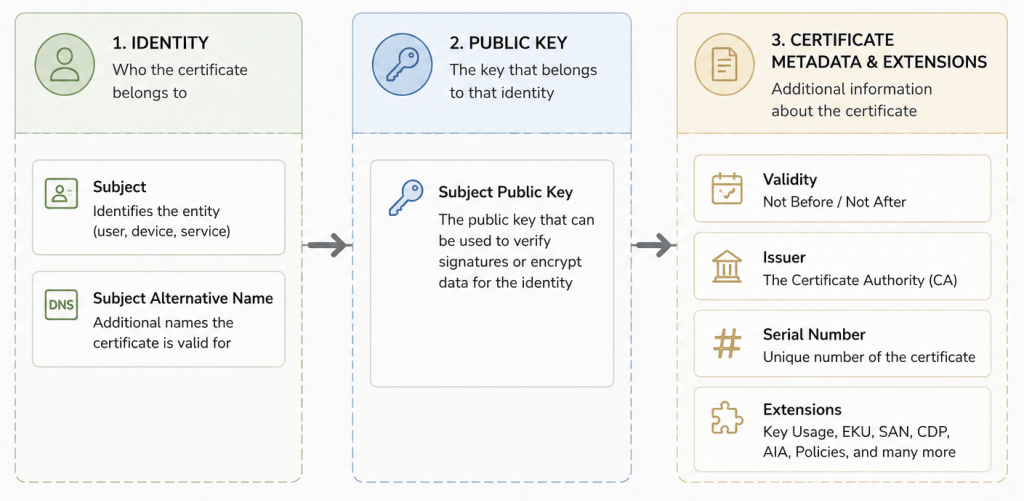
Although these fields may appear as separate items in the Certificate Viewer, internally they are grouped together into a single structure known as the TBSCertificate, which stands for “To Be Signed Certificate“. The name is quite literal. Everything contained within the TBSCertificate structure is exactly what the issuing Certificate Authority (CA) will protect with its digital signature. This means the Subject, Subject Alternative Name, Public Key, Validity period, Issuer, Serial Number and every certificate extension all become part of a single cryptographic object.

In the next section, we’ll look at what the Certificate Authority actually does with this information and why changing even a single character inside the TBSCertificate invalidates the certificate’s digital signature.
Getting into the details
Up to this point, we’ve looked at certificates using familiar Windows tools such as the Certificate Viewer and certutil. While these tools present certificate information in a human-readable format, they don’t reveal how a certificate is actually stored internally. To see that, we’ll use the free ASN.1 Editor by Sysadmins LV (Github). Unlike the Windows Certificate Viewer, which simply displays the certificate’s contents, an ASN.1 editor allows us to inspect the underlying DER-encoded ASN.1 structure exactly as it is stored inside the certificate.
Opening the certificate immediately reveals something interesting. Although Windows presents a certificate as a collection of individual fields, an X.509 certificate actually consists of just three top-level components.
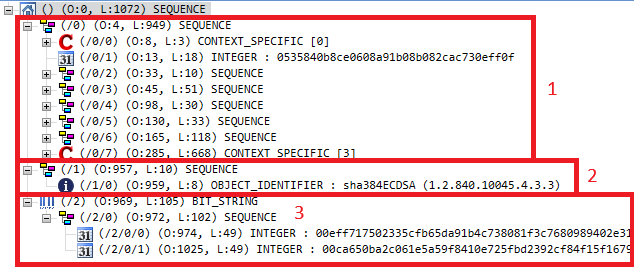
At the highest level, every X.509 certificate is organized as follows:
- TBSCertificate (1) – The complete certificate information that will be digitally signed by the Certificate Authority.
- Signature Algorithm (2) – The cryptographic algorithm used to create the digital signature.
- Signature Value (3) – The digital signature itself.
Expanding the TBSCertificate reveals all of the information we’ve discussed throughout this article. The Subject, Issuer, Validity period, Subject Public Key, Serial Number and every certificate extension are all contained within this single ASN.1 structure. Although Windows displays these as individual properties, they’re actually stored together as one cryptographic object. If you look closely at the ASN.1 structure, you’ll notice that the TBSCertificate is the first object inside the certificate. In this particular certificate, it begins at offset 4, followed by the Signature Algorithm and finally the Signature Value. The exact offsets depend on the certificate size and DER encoding, but the overall X.509 structure is always the same.
Now that we’ve identified the TBSCertificate and know exactly where it resides within the certificate, the next question becomes obvious:
What does the CA actually sign?
Now that we’ve identified the TBSCertificate, we can finally answer one of the most common questions about digital certificates: What does a Certificate Authority actually sign? The answer is actually really easy to understand. The CA does not encrypt the certificate, nor does it only sign the public key. Instead, it performs four simple steps:
- It takes the complete TBSCertificate.
- It calculates a cryptographic hash of that data.
- It digitally signs the hash using its private key.
- It stores the resulting digital signature inside the certificate as the Signature Value.
Visually, the process looks like this:
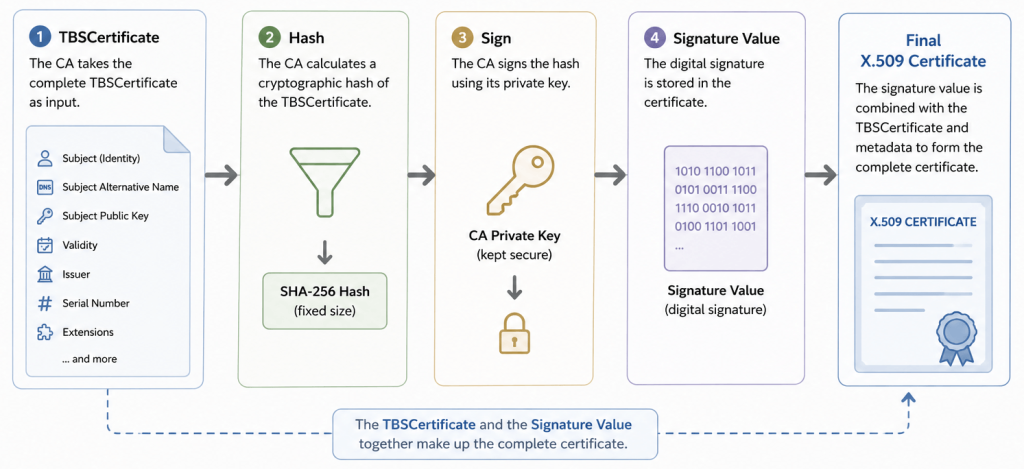
The important thing to understand is that the Certificate Authority never signs the individual fields separately. It signs the entire TBSCertificate as a single cryptographic object.
Did you know?
The digital signature stored inside an X.509 certificate is not the hash of the TBSCertificate. When a Certificate Authority (CA) issues a certificate, it first calculates a cryptographic hash of the complete TBSCertificate. That hash is then digitally signed using the CA’s private key, producing the Signature Value that is stored inside the certificate. During certificate validation, the client calculates the hash of the TBSCertificate again and verifies it against the value recovered from the digital signature using the CA’s public key. If the two values don’t match, the certificate’s digital signature is considered invalid.
If you inspect a certificate using certutil -dump, you may also notice a value called Signature Hash. Despite its name, this is not the hash of the TBSCertificate. Instead, it is a hash of the Signature Value itself. The actual hash of the TBSCertificate is only calculated during the signing and validation process and is never stored inside the certificate.
Many of the values shown by certutil are not stored inside the certificate at all. Values such as the Certificate Hash, Key ID Hash and Signature Hash are convenience values calculated by Windows to help administrators identify and compare certificates. They are derived from the certificate’s contents and do not form part of the X.509 certificate itself. In contrast, the TBSCertificate, Signature Algorithm and Signature Value are the actual components that make up every X.509 certificate.
Putting it to the test
Because the hash is calculated over the entire TBSCertificate, every field contributes to the final result. The Subject, Subject Alternative Name (SAN), Subject Public Key, Validity period, Issuer, Serial Number and every certificate extension all become part of the data protected by the CA’s digital signature. This raises an interesting question: What happens if we change just a single character? Rather than simply accepting the theory, let’s prove it. We’ll begin by validating the original certificate using certutil.
certutil -verify michaelwaterman.cer
As expected, the certificate validates successfully because it has not been modified since it was issued by the Certificate Authority, but what makes a Certificate Valid? Although certutil -verify performs several checks, one of the most important is verifying the certificate’s digital signature. During this process, Windows calculates a new cryptographic hash of the TBSCertificate and verifies it against the digital signature stored inside the certificate using the issuing CA’s public key.
If these values match, Windows knows that the TBSCertificate has not been modified since it was issued. If they don’t match, the certificate’s digital signature is considered invalid.
Next, we’ll open the same certificate using the ASN.1 Editor again. Yes, I know you could also use notepad and change a single character, but this tool is way cooler! Unlike the Windows Certificate Viewer, which only displays the contents of a certificate, an ASN.1 editor allows us to inspect and modify the underlying ASN.1-encoded data. For this demonstration, we’ll make a single, seemingly harmless change by modifying one character in the Subject Common Name, changing YE2 to YE3.
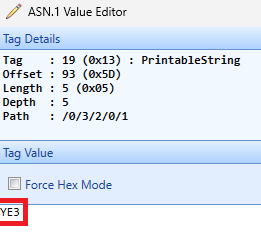
You could just as easily modify the Subject Alternative Name (SAN), the validity period, or almost any other field contained within the TBSCertificate, the outcome would be exactly the same. After saving the modified certificate, we’ll validate it once more.
certutil -verify michaelwaterman.cer
This time, validation fails. Although the certificate still appears to contain the same information, the modification changed the contents of the TBSCertificate. Consequently, the cryptographic hash calculated during validation no longer matches the hash that was originally signed by the Certificate Authority. The result is an invalid digital signature.
This simple experiment demonstrates one of the fundamental principles of Public Key Infrastructure. A Certificate Authority doesn’t protect individual fields inside a certificate, it protects the integrity of the entire TBSCertificate. Change even a single character after the certificate has been issued, and the digital signature immediately becomes invalid. That cryptographic guarantee is precisely what allows us to trust that the identity, public key and every other piece of information contained within a certificate remain exactly as they were when the Certificate Authority issued it.
In the end this means that every field inside the TBSCertificate contributes to the final hash. The Subject, the Subject Alternative Name (SAN), the public key, the validity period, the serial number, the issuer and every certificate extension all become part of the data that is protected by the CA’s digital signature. As a result, modifying even a single bit inside the TBSCertificate produces a completely different hash, causing the signature verification to fail. This cryptographic protection is what allows a relying party to trust that the certificate has not been modified since it was issued.
So, what’s a certificate anyway?
To wrap up, if someone asks you what a certificate is, you could simply answer, a certificate is a digitally signed data structure that binds an identity to a public key.
But as we’ve seen, there’s much more to it than that. A certificate contains identity information, a public key, validity information, issuer details and numerous extensions. Together, these form the TBSCertificate, which is cryptographically protected by the digital signature of the issuing Certificate Authority. So the next time you open a certificate in Windows, you’ll probably look at it a little differently, well probably not, but now you know what it is! You’re no longer looking at just a public key or a collection of fields, you’re looking at a carefully structured, cryptographically protected object that enables trust across modern digital communications.
Until next time…
Leave a Reply