Recently I was working on a side project involving Windows AppLocker, or whatever the marketing people decided to call the tool this week. Same engine, different sticker.
While creating a Publisher rule for a signed executable, I ran into the following error:
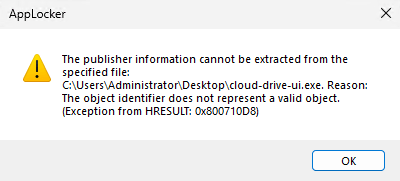
The publisher information cannot be extracted from the specified file: test.exe. Reason: The object identifier does not represent a valid object. (HRESULT: 0x800710D8)
At first glance, this looks like a straightforward signing issue. The natural assumption is that the executable is either unsigned, or that the embedded signature is somehow malformed. My assumption turned out to be wrong. (Yes, I’m old and I still make plenty of mistakes, and I do try to learn from them.)
The binary was properly signed, the Authenticode signature validated successfully, and yet AppLocker still failed to extract publisher information.
What started as a simple AppLocker troubleshooting exercise quickly turned into a much more interesting discovery around Windows trust chain construction and automatic root retrieval. Of course, if you’ve been reading this blog for some time, this had to be about certificates.
Let’s dive in!
Breaking down the HRESULT
The HRESULT itself was worth translating before making any assumptions. The AppLocker wizard returned: 0x800710D8. Whenever Windows throws a mysterious error code at me, one of the first tools I still reach for is the Microsoft Error Lookup Tool (ERR.exe). Running the following command immediately makes the error much more readable:
Err_6.4.5.exe 0x800710D8
This translates to:

If you do not have ERR.exe available, PowerShell can do the same translation natively:
[ComponentModel.Win32Exception]4312Which, obviously also returns the same translated code.
That message is technically correct, but still not very helpful until you understand what AppLocker is trying to do behind the scenes. In this case, the signature itself was valid. The real issue was that Windows could not yet translate the certificate chain into a fully trusted publisher identity object. In other words:
the executable was signed, but the trust path was not yet fully established
Proving my theory
To gather some evidence, I ran a quick trace with Sysinternals Process Monitor, which immediately confirmed the behavior I was starting to suspect.
As soon as I selected the signed binary in the AppLocker wizard, Windows queried the following registry location:
HKLM\SOFTWARE\Microsoft\SystemCertificates\AuthRoot\CertificatesThe signing Root CA was already present there, which was expected. What was far more interesting was what was not there. The intermediate CA responsible for issuing the code-signing certificate could not be found in the expected certificate stores yet. How did I verify that?
By opening the binary and inspecting the Digital Signatures → Certification Path, the first thumbprint in the chain matched the Root CA entry that Procmon had already shown in the registry.
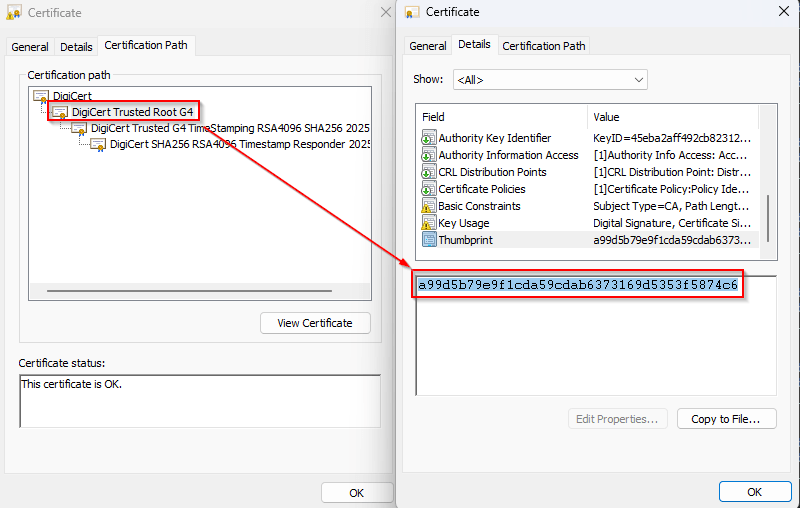
However, the thumbprints of the subsequent issuing CA certificates were still missing, which immediately pointed to the real issue:
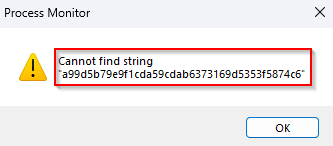
Windows had a trust anchor, but not yet the full issuing chain required to build a valid publisher identity
At that point, the HRESULT suddenly started making a lot more sense:
The object identifier does not represent a valid object
The “object” in this case was not the executable itself. It was the missing issuing CA certificate object required to complete the certificate chain. Without that intermediate certificate, Windows could not fully validate the publisher chain, which explains why AppLocker failed to extract the Publisher information during the first attempt.
Building a validation script
To validate the behavior, I built a PowerShell script (Get-CertificateChainValidation.ps1) that performs four steps:
- Extract the leaf signing certificate from the binary
- Build the chain using
.NET X509Chain - Compare all chain thumbprints against:
- Current User Trusted Root store
- Current User Intermediate store
- [optionally] Export the results to CSV for before/after comparison
This made it possible to observe exactly which certificates were involved in the chain and whether they were already present in the local user stores. The results were immediately interesting. After running the validation script , Windows had automatically retrieved the missing certificates and placed them into the correct stores.

At that point:
- the issuing chain was complete
- root and intermediates appeared in the expected Current User stores
- AppLocker could successfully create the Publisher rule
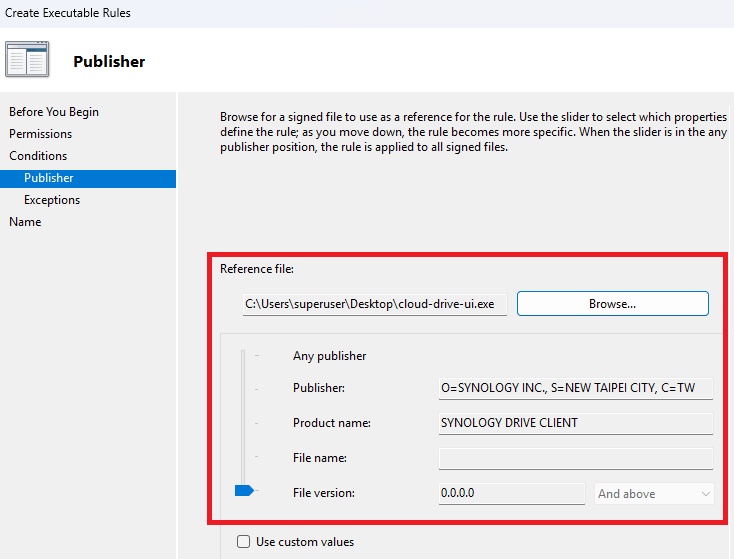
This strongly suggests that certificate chain validation itself is sufficient to trigger the Microsoft Root Certificate Program. Remember that I wrote a (I might say a popular) blog about this subject a little while ago? I highly recommend reading it if you would like to know the inner workings. Even more interesting, the behavior appears to require at least one chain-building pass before the trust material becomes locally available. In practice, the flow appears to be:
Start validation → discover missing trust anchors
Automatic root retrieval → populate stores
Binary validation → successful full chain resolution
That three-stage behavior explains exactly why AppLocker initially failed with 0x800710D8.
The practical takeaway
The most valuable lesson from this research is simple:
running certificate chain validation can itself bootstrap trust for AppLocker
In my case, simply running the PowerShell validation script twice was enough to:
- trigger root retrieval
- populate the required stores
- allow AppLocker to extract publisher metadata successfully
P.S. If you do not want to use the PowerShell script, manually opening the signed binary, viewing its Digital Signatures, and clicking through the Certification Path appears to trigger the same chain-building behavior. In my testing, that produced a similar result, where Windows started resolving and retrieving the missing certificate chain components.
This makes chain validation not only a troubleshooting step, but also a practical way to understand how Windows builds trust behind the scenes. It also perfectly connects back to my earlier work on the Microsoft Root Certificate Program, where I covered how Windows dynamically retrieves trusted roots during validation workflows. This AppLocker scenario turned out to be a very real-world example of that exact mechanism.
And that’s it for this week! As always I hope this is useful for someone, leave a comment or question and see you next time.
Leave a Reply